How JD Edwards AP Automation Cuts Fraud Risk
If AP work happens manually in JD Edwards, fraud risk goes up. I’d sum it up like this: the biggest gaps usually show up in invoice intake, duplicate checks, approvals, payment release, vendor bank changes, and audit records.
Here’s the short version:
- Invoices sent by email or PDF can slip in before anyone checks them against JD Edwards data.
- Manual entry can lead to duplicate payments. In manual AP, about 0.1% to 0.5% of invoices are paid twice.
- Loose approval steps make it hard to prove who approved what and when.
- Payment access problems can let the wrong person start or release a payment.
- Vendor and bank detail changes done outside a controlled process create a direct fraud path.
- Audit logs help teams spot odd activity before money goes out.
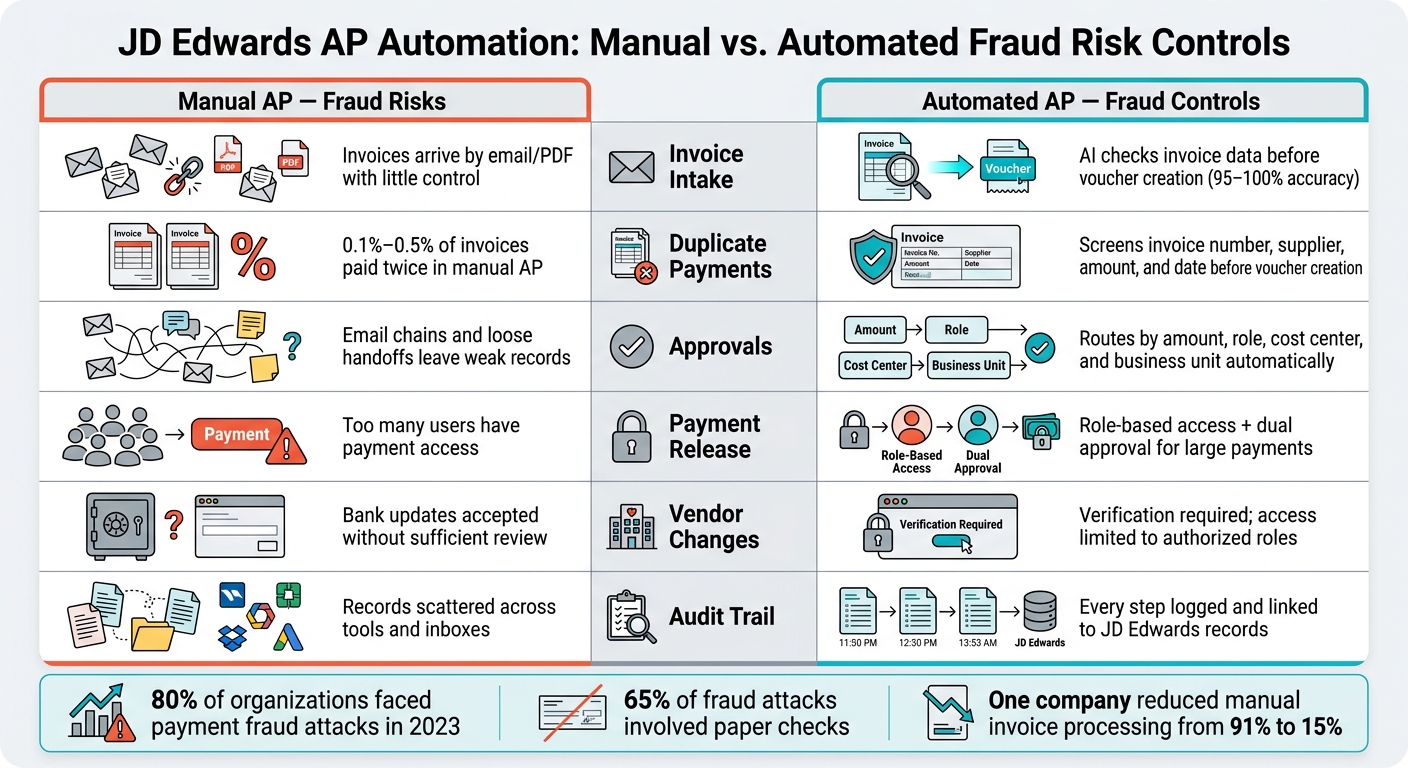
I also see a simple pattern in the article: automation lowers risk by checking invoices early, routing approvals by rule, limiting who can release payments, reviewing supplier data, and keeping a clear record of every step.
A few numbers stand out:
- 95% to 100% data extraction accuracy from AI-based invoice processing
- 80% of organizations faced payment fraud attacks or attempts in 2023
- 65% of fraud attacks in 2023 involved paper checks
- One company cut manual invoice processing from 91% to 15%
| Risk area | Manual AP problem | What automation does |
|---|---|---|
| Invoice intake | Data comes in by email, scan, or PDF with little control | Checks invoice data before voucher creation |
| Duplicate payments | Staff may miss repeat invoices | Screens invoice number, supplier, amount, and date |
| Approvals | Email chains and handoffs leave weak records | Routes by amount, role, cost center, and business unit |
| Payment release | Too many people may have payment access | Limits access and adds dual approval for large payments |
| Vendor changes | Bank updates may be accepted without enough review | Adds verification and role limits |
| Audit trail | Records are scattered across tools and inboxes | Logs each step tied back to JD Edwards |
If you use JD Edwards, the main takeaway is simple: the ERP can only control what reaches it. So fraud control has to start before voucher creation and continue through approval, payment, supplier updates, and review.
JD Edwards in Action: Automate AP, Forecast Cash Flow & Eliminate Manual Reporting
Secure Invoice Capture and Duplicate Checks
Capture controls are the first filter. They stop bad invoices before those invoices turn into vouchers.
Match Invoices Against JD Edwards Records at Capture
When invoices come in by email, scan, or SFTP, centralized capture checks them before voucher creation starts. AI digitization pulls vendor, invoice, and line-item data with 95% to 100% accuracy.
Then the system checks that invoice against JD Edwards vendor, PO, and receipt records. Two-way matching confirms the invoice lines up with the PO. Three-way matching adds receipt confirmation too.
If price or quantity doesn’t match, the invoice gets flagged before the voucher is posted. That blocks invoices with no valid PO or receipt from moving ahead. AP Express syncs supplier records, business units, and purchase orders in real time over secure HTTPS.
That same captured data also feeds duplicate screening before payment. So instead of finding a problem late in the process, AP teams can catch it at the front door.
Stop Duplicate Invoices Before Payment
Manual processes leave room for repeat payments. In those setups, roughly 0.1% to 0.5% of all invoices are paid in duplicate. And a lot of the time, no one spots the issue until after a voucher has been created or money has already gone out.
Automated duplicate checks look across:
- Invoice number
- Supplier
- Amount
- Date
- Near-duplicate invoice numbers, amounts, or dates
That review happens before voucher creation, which gives AP a much better shot at stopping duplicate payments early.
McElroy Metal cut manual invoice processing from 91% to 15% after putting AP Express into its JD Edwards workflow. At the same time, the company tracked 2,300 weekly invoices and kept 99% current balances.
Once invoices pass capture controls, approval routing decides who can release them next.
Approval Routing and Payment Controls That Enforce Policy
Once invoice capture gets past the front end, approval routing determines who can sign off and who can release payment.
Manual approvals often run on email threads and loose handoffs. That’s where things start to slip. Invoices can sit in limbo, or move ahead without the right approval. Automation shuts those gaps by applying the same policy every single time.
Route Approvals by Amount, Cost Center, and Role
Automated workflows route each invoice based on amount, cost center, business unit, supplier type, or whether it’s a non-PO invoice. If an invoice goes above a set threshold, it moves to a senior approver on its own. If it’s a non-PO invoice, it follows a separate review path.
Just as important, the system enforces segregation of duties at each step. The user who enters an invoice can’t approve it. The person who approves it can’t release the payment. That control is built into the workflow instead of being left to someone’s discretion. In 2023, 80% of organizations were targets of payments fraud attacks or attempts – and self-approval weaknesses in manual processes are a common way in.
Approval rules also stay aligned with live JD Edwards data.
Restrict Payment Runs and High-Value Payments
Approval rules are one side of the equation. Payment release needs the same level of control.
Role-based access limits payment execution to authorized users only. For larger disbursements, dual approval adds a second sign-off before ACH or check release.
Paper checks are still the payment method most often exposed to fraud, showing up in 65% of fraud attacks in 2023. Moving to electronic payments cuts that risk, but only if access to start those payments is locked down.
These controls improve visibility, enforce segregation of duties, and create a clear audit trail.
Supplier Data Review and Audit Logs Connected to JD Edwards
Even strong invoice controls can fall apart if vendor records and bank details are left too open. If someone can add a vendor or edit banking data without a second look, fraud still has a path in. That puts supplier master controls and audit logs in the role of the last line of defense.
Control Vendor Setup and Bank Detail Changes
Require vendor verification before approval, and check new suppliers against the JD Edwards Address Book to catch fictitious or duplicate records early.
Bank detail changes need that same level of care. Instead of taking a change request by email at face value, use a documented verification process. Access to banking data in JD Edwards should be limited to authorized roles, so one person can’t request, approve, and process the same change.
A supplier self-service portal can add another control point. With AP Express, vendors manage their own profiles and banking details through a controlled interface, and updates are standardized before they sync to JD Edwards.
Review dormant and duplicate suppliers on a fixed schedule.
Use End-to-End Audit Logs for Detection and Compliance
Once supplier records are locked down, each change should be traceable.
Every step in the AP process should leave a record: who captured the invoice, who approved it, what exceptions came up, when payment was released, and what supplier data changed. When AP automation connects with JD Edwards through JD Edwards batch processing, the audit trail stays linked to JD Edwards records, which makes audit review much easier. Logs also keep each supplier change tied to the JD Edwards record.
That kind of logging makes suspicious activity stand out. Instead of a hidden one-off issue, it starts to look like a pattern your team can see and act on. With logs in place, exception review becomes part of the normal workflow instead of a fire drill. Your team can spot suspicious patterns before a payment goes out.
Conclusion: How JD Edwards AP Automation Lowers Fraud Exposure
These controls close the main fraud gaps in JD Edwards AP. AP fraud often begins with small misses: an unverified vendor, a duplicate that slips through, or an approval that gets around policy. Each control blocks one gap. Each layer backs up the next. So if one control misses something, another can catch it. Put together, they create layered protection from invoice capture all the way to payment release and supplier changes.
For JD Edwards teams, that means tighter control, faster exception review, and a cleaner audit trail. AP Express connects directly with JD Edwards and brings those controls into one automated workflow.
The goal isn’t to replace JD Edwards. It’s to make it harder for fraud to get through while cutting down on manual work.
FAQs
How does AP automation prevent fraud before voucher creation?
AP automation helps stop fraud before a voucher is created. It replaces manual work with digital controls, which cuts down on errors and gives teams tighter oversight.
It uses AI-powered data capture to check invoices against synced master data, including purchase orders, receipts, and supplier records.
On top of that, it flags unusual transactions and applies automated matching and approval workflows. That way, only verified, legitimate invoices move into JD Edwards for payment.
What AP controls matter most in JD Edwards?
The most important AP controls in JD Edwards blend automated checks with tight oversight:
- Three-way matching of purchase orders, receipts, and invoices
- Real-time duplicate invoice detection, including fuzzy matching
- Role-based access controls to enforce segregation of duties
- ERP-connected audit logs with timestamped transaction and approval history
How do audit logs help catch AP fraud?
Audit logs help catch AP fraud because they create a permanent, transparent record of every transaction and system action. With automated time stamps and user IDs, you get a clear digital trail that makes unauthorized activity much harder to hide.
When those records live right inside the ERP, they’re easy to review during audits, for compliance checks, and for real-time tracking of discrepancies.
Related Articles

How to Calculate ROI on AP Automation Software
May 27, 2026 Calculating ROI for AP automation software boils down to comparing your savings...
Top 7 Benefits of Oracle ERP AP Integration
June 22, 2026 Oracle ERP AP integration connects accounts payable systems directly to Oracle ERP...