
How to Calculate ROI on AP Automation Software
Calculating ROI for AP automation software boils down to comparing your savings with the costs of implementing and maintaining the system. Here’s the key takeaway: AP automation can reduce invoice processing costs from $15–$40 per invoice to just $2–$5, saving businesses thousands annually. For many mid-sized companies, ROI can reach up to 700% in the first year, with most seeing payback within 6–12 months.
Here’s what you need to know upfront:
- ROI Formula: [(Total Annual Savings – Total Annual Costs) ÷ Total Annual Costs] × 100
- Savings Sources:
- Lower labor costs (manual tasks cut by 85%).
- Fewer errors (99.5% accuracy vs. 5–10% error rates).
- Early payment discounts (1–2% of invoice value).
- Avoiding late fees.
- Costs to Consider:
- Setup fees (e.g., $2,500).
- Monthly subscriptions (e.g., $145/month).
- Training and support ($5,000+ for mid-sized businesses).
For example, a company processing 6,000 invoices annually could save $43,500 in the first year while spending $5,440 on automation, resulting in a 700% ROI. In subsequent years, ROI often grows as upfront costs are eliminated.
The benefits aren’t just financial. Automation improves efficiency, reduces fraud risk, and lets your team focus on higher-value tasks. Use the ROI formula to justify your investment with clear, measurable data.
Invoice Automation & ROI: Costs, Payback, and Business Case Explained
The ROI Formula for AP Automation
Calculating ROI for AP automation is simple: [(Total Annual Savings – Total Annual Costs) / Total Annual Costs] × 100. This formula helps you measure your financial return by comparing the money saved to the costs invested, providing a clear percentage for leadership to review.
For instance, if your automation saves $100,000 each year but costs $50,000, your ROI would be 100%. In other words, you’ve doubled your investment. Let’s dive into the key elements of this calculation.
ROI Formula Components
Three main factors determine the success of automation:
- Total Annual Savings: This includes all the financial benefits gained from automation. Examples are reduced labor costs from fewer manual tasks, early payment discounts (usually 1–2% of invoice value), avoiding late fees, and minimizing errors and fraud.
- Total Annual Costs: These are all the expenses tied to the automation system. This includes setup fees, recurring licensing costs, integration, training, and any per-invoice transaction fees some vendors might charge.
- Net Savings: This is the difference between Total Annual Savings and Total Annual Costs. It reflects the actual amount your business retains after covering the expenses, offering a clear view of the solution’s value.
What Makes a Good ROI?
A good ROI means your savings exceed your costs, proving the investment is profitable. While any positive ROI is a win, not all are equally impactful. Generally, an ROI of 60% or higher is considered strong for AP automation, and top-performing implementations often surpass 100% once the initial costs are recovered.
For perspective, mid-sized companies can see ROIs as high as 700% within the first year.
ROI can fluctuate over time. High upfront costs might lead to a lower or even negative ROI initially, but as monthly savings accumulate, the annual returns can grow significantly. To get the full picture, it’s best to calculate ROI on an annual basis to account for these compounding savings.
Calculating Automation Costs
To accurately determine ROI, it’s crucial to account for every automation-related expense – from initial setup to ongoing fees. Overlooking even minor costs can lead to unrealistic expectations, so make sure every dollar spent is included.
Automation expenses generally fall into three categories: one-time implementation costs, recurring operating fees, and training expenses. For instance, consider a $2,500 setup fee, a $145 monthly subscription, and $100 per month for integration support. Together, these add up to approximately $5,440 in the first year. Breaking costs into these categories provides a clear view of payback timelines and helps set realistic expectations. Let’s dive into each category.
Setup and Implementation Costs
Upfront costs cover everything needed to get your system up and running. This includes software licensing, integrating the platform with your ERP system, and configuring workflows to match your approval processes. For more complex AP setups, you might need to hire consultants or vendor specialists to ensure a smooth transition.
Don’t forget to include data preparation tasks, like cleaning up vendor master data to eliminate duplicates and verify coding rules. If your current processes rely on older systems, you may also need to invest in additional hardware. For mid-sized companies, implementation costs typically range from $2,500 to $35,000.
To get an accurate estimate, share 12 months of AP data with your vendor. This allows them to create a tailored cost model based on your invoice volume and processing patterns. When calculating ROI, consider amortizing these one-time costs over three to five years to better understand the system’s long-term value.
Recurring Operating Costs
Most AP automation platforms use a SaaS pricing model, which may be structured as a flat monthly rate, a per-user license, or a per-invoice fee. For example, you might pay $145 per month for a subscription, plus $100 for integration support. Alternatively, some vendors offer per-invoice pricing (e.g., around $3 per invoice) or flat-rate plans (e.g., approximately $3,000 per month).
In addition to subscription costs, remember to factor in expenses like cloud storage for digital archives and service contracts for system maintenance and updates. Many vendors use tiered pricing, where costs increase as your invoice volume grows. If your invoice volume is low, per-invoice pricing might be more affordable. However, as your volume increases, a flat-rate plan could offer better overall savings.
Lastly, include the costs of training and onboarding to complete your analysis.
Training and Onboarding Costs
Training your team to use the new system involves both time and money. These costs include the labor hours your AP staff and managers spend in training sessions instead of focusing on their usual tasks. You’ll also need to train department heads and managers to use digital approval workflows, often through mobile tools. For a mid-sized company with around 500 employees, training and change management expenses are typically around $5,000.
Measuring Cost Savings and Benefits
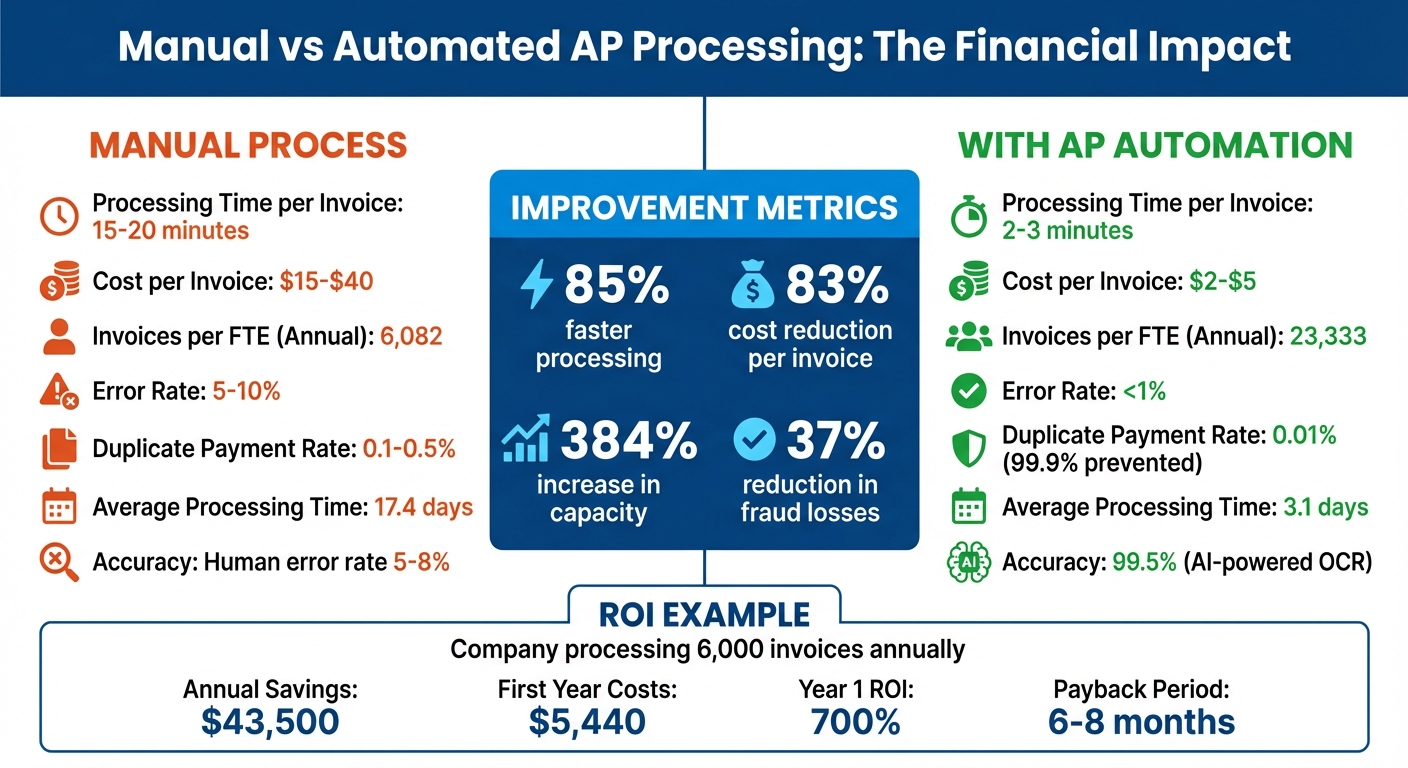
To gauge the financial impact of automation, compare your current manual costs with the savings achieved post-automation. These savings typically fall into three main areas: lower labor costs, reduced errors and fraud losses, and captured payment discounts.
Start by determining your baseline costs for manual processes. This includes tracking how much time your accounts payable (AP) team spends on tasks like data entry, routing approvals, managing exceptions, and answering vendor inquiries. On average, manual invoice processing costs between $15 and $40 per invoice, while automation reduces this to just $2 to $5. For a company handling 10,000 invoices annually, this could mean yearly savings of $130,000 to $350,000.
Break down these savings into specific metrics. Labor savings come from reduced processing time, automation minimizes costly errors, and faster workflows unlock early payment discounts. Let’s explore these areas further.
Labor Cost Savings
Labor savings are calculated by comparing the time spent on manual processing versus automated workflows. For instance, manual invoice processing takes about 15–20 minutes per invoice, while automation reduces this to just 2–3 minutes.
Here’s an example: If your AP clerk earns $25 per hour and processes 800 invoices monthly, automation saves about 15 minutes per invoice. Multiply that by 800 invoices, and you’ve reclaimed 200 hours each month. At $25 per hour, that translates to $5,000 in monthly savings, or $60,000 annually.
Another way to measure efficiency is by looking at invoices processed per full-time equivalent (FTE). A manual AP team typically handles around 6,000 invoices per FTE annually, while an automated team can process over 23,000, a 384% increase in capacity. This boost allows your team to manage growth without hiring additional staff, freeing up time for tasks like vendor negotiations and spend analysis.
When calculating labor costs, include fully loaded hourly rates, which account for salary, benefits, and overhead. For example, a $50,000 annual salary equates to roughly $35 per hour when fully loaded. Also, consider time saved on supplier inquiries, which automation can cut by 50%, and error corrections, which drop from 5–10% of invoices to under 1%.
| Metric | Manual Process | With AP Automation | Improvement |
|---|---|---|---|
| Processing Time per Invoice | 15–20 minutes | 2–3 minutes | 85% faster |
| Cost per Invoice | $15–$40 | $2–$5 | 83% reduction |
| Invoices per FTE (Annual) | 6,082 | 23,333 | 384% increase |
Beyond labor savings, automation significantly reduces errors and fraud risks.
Error and Fraud Prevention Savings
Errors and fraud come with hidden costs. Manual data entry results in errors on roughly 10% of invoices, and each error takes 15–20 minutes to correct. Automated systems achieve up to 99.5% accuracy using AI-powered optical character recognition (OCR), compared to human error rates of 5% to 8%.
To quantify savings, multiply your current error rate by the time spent fixing errors and your hourly labor rate. For example, if you process 1,000 invoices monthly with a 7% error rate, that’s 70 errors. At 17.5 minutes per error and $30 per hour, your team spends $612.50 monthly – or $7,350 annually – just fixing mistakes. Automation reduces this error rate to under 1%, saving over $6,600 per year.
Duplicate payments are another costly issue. Manual processes lead to duplicate payments in 0.1%–0.5% of invoices. For a company with $10 million in annual AP spend, a 0.3% duplicate rate equals $30,000 in overpayments. Automated three-way matching can prevent 99.9% of these duplicates. Additionally, automation reduces financial fraud losses by an estimated 37%, a critical safeguard given that 79% of U.S. organizations experienced payment fraud in 2024.
“AP automation helps prevent and detect fraud by enforcing internal controls, segregation of duties, and by providing full real-time transparency to AP workflows.”
Before implementing automation, review your last 12 months of AP activity to identify duplicate payments and calculate the time spent resolving exceptions like incorrect general ledger codes or price mismatches. This will help establish a baseline for measuring post-automation improvements.
Early Payment Discounts and Late Fee Avoidance
Automation shortens processing times from 17.4 days to just 3.1 days, making it easier to capture early payment discounts and avoid late fees.
Early payment discounts typically range from 1% to 2% of the invoice amount. For example, if your company spends $5 million annually and 40% of vendors offer 2/10 net 30 terms (a 2% discount for payment within 10 days), capturing these discounts could save $40,000 annually. The formula is simple: (Annual Spend × Percentage of Vendors Offering Discounts × Discount Rate).
“More vendors are allowing for discounts now, because they’re seeing the quick payment… We’ll get a 1–2% discount for paying early.” – James Hardy, CFO, SAM Construction Group
Automation also helps avoid late payment penalties by sending automated reminders and notifications to approvers. Mid-sized companies average $30,000 per year in late fees. Cutting these penalties in half would save $15,000 annually.
Track metrics like your discount capture rate (discount invoices ÷ total eligible invoices × 100) and on-time payment percentage. A low capture rate may indicate a higher risk of late fees and strained vendor relationships. Timely payments not only improve vendor relationships but can also lead to better contract terms and negotiated rates in the future. These improvements directly contribute to your total annual savings and enhance your return on investment (ROI).
Calculating Net Savings and ROI
This section pulls together the numbers from the earlier cost and benefit analysis to show your net savings and ROI. To figure this out, add up your annual savings, subtract your annual costs, and apply the ROI formula to see the value you’re getting for every dollar spent on automation.
Start by adding up your savings from areas like reduced labor costs, fewer errors, and early payment discounts. Then, subtract your total annual costs, which include one-time setup fees along with recurring subscription and support expenses. The result is your net savings – the actual profit generated by automation. Let’s break this down with an example.
ROI Calculation Example
Imagine your company processes 500 invoices monthly (or 6,000 annually) and adopts AP automation.
Annual Savings:
- Labor Savings: Streamlined processes could save you about $25,000 per year.
- Error Reduction Savings: Cutting down on invoice errors might save an additional $3,500 annually.
- Early Payment Discounts: Taking advantage of early payment discounts could add $15,000 to your yearly savings.
Total Annual Savings: $25,000 + $3,500 + $15,000 = $43,500.
Year 1 Costs:
- Setup and integration (one-time): ~$2,500
- Monthly subscription (around $145/month): ~$1,740 annually
- Ongoing support fees (about $100/month): ~$1,200 annually
Total First-Year Costs: $2,500 + $1,740 + $1,200 = $5,440.
Net Savings: $43,500 – $5,440 = $38,060.
ROI Calculation:
ROI (%) = ($38,060 / $5,440) × 100 ≈ 700%.
In this scenario, every dollar invested brings back about $7 in savings. Many mid-sized companies see a break-even point within six to eight months.
Once you’ve calculated ROI for the first year, adjust your numbers for subsequent years, accounting for recurring costs only.
Annualizing Costs and Benefits
To compare costs and savings year over year, separate one-time expenses from ongoing ones. While Year 1 includes setup fees, later years typically involve just subscription and support costs. For example, in Year 2, with recurring costs of $2,940 annually:
Net Savings in Year 2: $43,500 – $2,940 = $40,560.
Year 2 ROI: ($40,560 / $2,940) × 100 ≈ 1,380%.
When estimating labor savings, use fully burdened labor rates. Multiply base salaries by 1.25 to factor in benefits and overhead. For instance, if an AP clerk earns $50,000 annually, their fully loaded hourly rate might be around $35.
Finally, measure your cost per invoice as a key efficiency metric. Divide your total annual AP costs by the number of invoices processed. If manual processing costs $15 per invoice and automation reduces that to $3, you’re looking at an 80% cost reduction – a compelling figure to share with stakeholders.
Long-Term ROI and Payback Period
Looking beyond the first year of AP automation gives you a clearer picture of its financial benefits. The initial year often includes setup costs that can temper early returns, but the real value emerges in the following years when these one-time expenses are out of the equation, and recurring costs remain steady.
ROI Growth Over Time
After the first year, businesses often notice a significant boost in ROI. Why? Those upfront implementation costs are no longer weighing down the numbers. Recurring subscription fees become a smaller slice of overall expenses, especially when compared to the growing savings. Plus, AP automation is built to scale. As your business expands and invoice volumes rise, the system can handle the extra workload seamlessly – no need to hire additional AP staff. To put it into perspective, an automated system can process about 23,333 invoices per employee annually, compared to just 6,082 with manual methods. This efficiency means that as invoice volumes grow, so do your savings. But when exactly can you expect these savings to cover your initial investment? Let’s break that down.
Calculating Payback Periods
The payback period is a key metric that shows when your investment starts turning into profit. It’s calculated by dividing your initial implementation cost by your monthly net savings, giving you a straightforward timeline for recouping your investment. For most mid-sized businesses, industry data suggests a break-even point within six to eight months. High-volume organizations may see payback even faster – sometimes in as little as six months. This timeline highlights when automation shifts from being an expense to becoming a profit-driving tool, giving you a clear sense of its long-term value.
Conclusion
Start by documenting your current manual costs – this includes labor hours, materials, late fees, and missed discounts. Then, estimate the potential savings from reduced processing costs, fewer errors, and capturing early payment discounts. Don’t forget to factor in the total cost of ownership, which includes software licenses, implementation fees, training, and ongoing support. Once you have these numbers, plug them into the ROI formula to calculate a clear percentage and payback period.
For a strong business case, rely on real metrics instead of rough estimates. Use your current cost per invoice as a baseline, and track the same KPIs after implementing the software to confirm it delivers on its promises. This structured approach helps you measure both the tangible and intangible benefits of automation.
ROI goes beyond just numbers. While it includes measurable savings, it also accounts for less obvious advantages like better vendor relationships, improved audit readiness, and higher employee morale. In fact, 94% of AP professionals report feeling more engaged and less burned out when tools handle repetitive tasks, which can also reduce turnover.
FAQs
How can I accurately calculate ROI for AP automation software?
To calculate ROI for AP automation accurately, start with a standard formula that factors in measurable savings. These include reductions in labor costs, lower processing expenses, fewer errors, and savings from early-payment discounts. Use real data from your organization, such as invoice volume, staff salaries, error rates, and discount capture rates, to ensure the calculation reflects your specific operations.
For a more precise estimate, compare your assumptions with industry benchmarks or rely on a trusted ROI calculator. Once the software is in place, revisit these metrics to confirm your initial projections and assess the actual improvements in efficiency and cost savings.
What should I look for in an AP automation provider?
When selecting an AP automation provider, it’s crucial to take a close look at the total cost of ownership. This goes beyond just the subscription fees. Factor in one-time setup costs, ongoing licensing, usage-based pricing, and any additional charges for extra users, integrations, or support. By understanding the full scope of these expenses, you can better weigh them against the potential savings the solution offers.
It’s also important to evaluate how the platform integrates with your current accounting or ERP systems. A solution that aligns seamlessly with your existing tools and can adapt as your business grows is a smart choice. Don’t overlook security features either – encryption, role-based access, and fraud detection are essential for protecting payments and staying compliant. Additionally, strong reporting and analytics capabilities can help you monitor savings, boost efficiency, and measure ROI effectively over time.
Lastly, consider the provider’s support and training resources. Implementation assistance, accessible training materials, and responsive customer service can make a big difference in how quickly you see results and ensure the system operates smoothly for the long haul.
How does AP automation improve productivity and employee satisfaction?
AP automation transforms productivity by cutting out tedious manual tasks like invoice processing and data entry. With automated workflows, businesses can slash processing times by up to 70% and reduce data entry errors by nearly 90%. This means your team can focus on strategic responsibilities like vendor management and financial analysis instead of getting bogged down in repetitive work. Plus, automation allows you to manage a larger volume of invoices without needing to hire additional staff, delivering clear and measurable returns for your company.
Beyond boosting efficiency, automation has a positive impact on employee satisfaction. Manual processes and frequent errors can be frustrating, but smoother workflows and fewer delays create a less stressful work environment. When finance professionals can shift from repetitive tasks to more meaningful, analytical work, they often feel more motivated and fulfilled in their roles. This shift not only improves morale but also gives employees a stronger connection to their work’s purpose.
Related Articles

The Best Out-of-the-Box AP Automation Solutions
December 28, 2021 In recent conversations with several prospects, we learned that they are implementing...
Be Prepared for the Important Questions
January 25, 2022 Last month, we blogged about the importance of customers asking AP automation...