
Invoice Processing Automation Overview
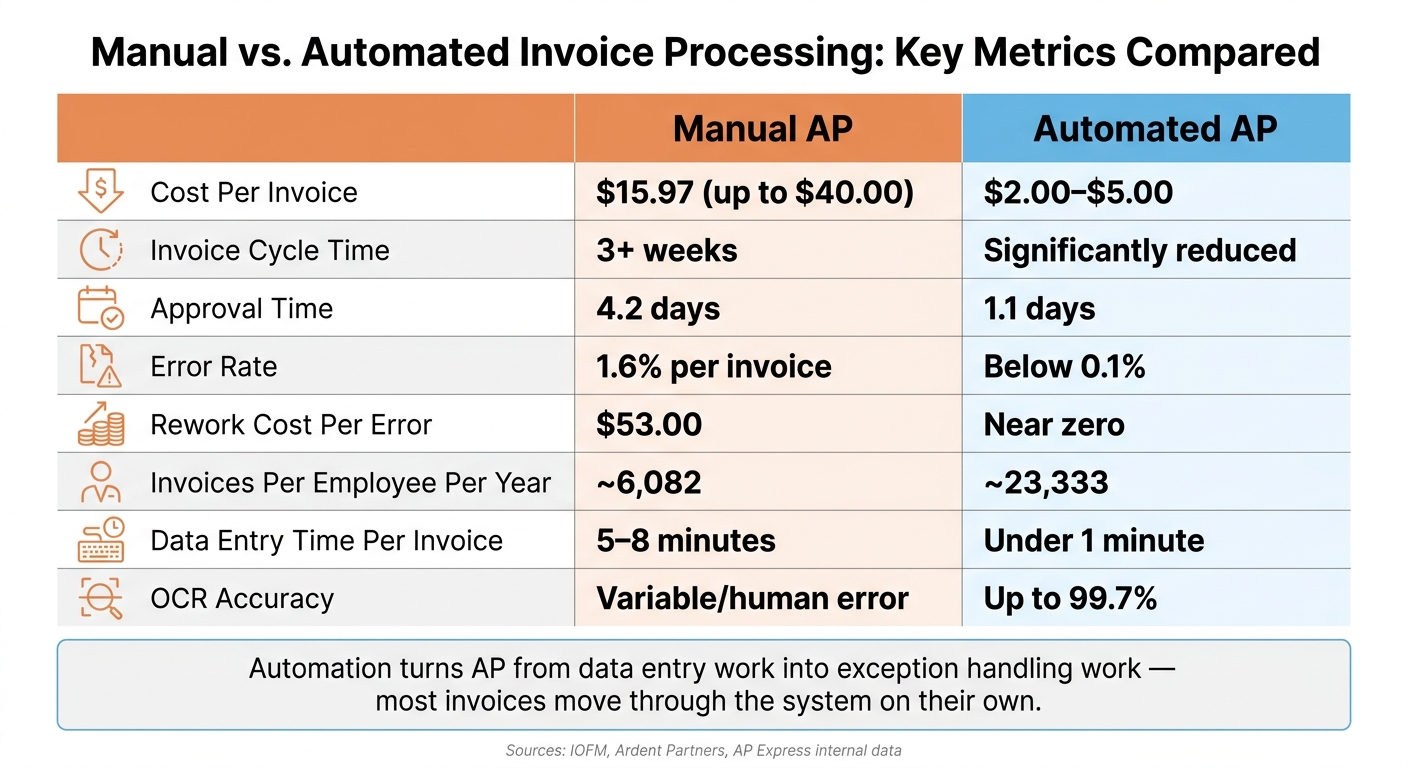
If you still process invoices by hand, you’re likely paying too much and waiting too long. Manual AP can cost about $15.97 per invoice and sometimes more than $40.00, while automation can bring that down to roughly $2.00 to $5.00.
Here’s the short version: invoice processing automation software reads invoices, checks the data, matches them to POs and receipts, routes them for approval, flags problems, and posts clean records into Oracle. That cuts cycle times, lowers errors, trims late payments, and gives AP teams a live view of invoice status.
What this article covers:
- How manual AP slows down invoice entry, approvals, matching, and payment
- How OCR and AI extract invoice data from email, scans, portals, and EDI
- How validation, GL coding, PO matching, and duplicate checks work
- How approval routing and exception queues keep invoices moving
- Which AP metrics matter most, like cost per invoice, error rate, and approval time
- How Oracle teams use AP Express with Oracle EBS, Oracle ERP Cloud, and JD Edwards
- What to do before rollout, including vendor data cleanup, rule setup, pilot testing, and KPI tracking
A few numbers stand out right away:
- Manual approval chains can push invoice cycles to 3+ weeks
- Manual entry errors run around 1.6% per invoice
- Rework can cost about $53.00 per error
- Automation can push errors below 0.1%
- Approval time can drop from 4.2 days to 1.1 days
- One AP employee can go from about 6,082 invoices per year to 23,333
If I were boiling the whole topic down to one idea, it would be this: invoice automation turns AP from data entry work into exception handling work. Most invoices move through the system on their own, and people step in only when something does not match or needs review.
That’s the core idea behind the rest of the article.
How invoice processing automation works
Invoice capture with OCR and AI-based data extraction
Automated AP begins by turning invoices from email, supplier portals, scans, and EDI into structured data. That cuts out hand entry and gets invoice data ready for validation. After that, the system checks the invoice before sending it to the next step.
Modern AI extraction uses NLP to read what an invoice means, not just how it looks on the page. So it can pull supplier name, invoice number, date, PO number, line items, and tax across many formats without prebuilt vendor templates. AP teams can then review the invoice image and the extracted fields side by side before posting.
Validation, GL coding, PO matching, and duplicate detection
Once the data is captured, the system runs a set of automated checks before anything moves ahead.
Validation compares the extracted data against the master vendor list and tax rules. Matching logic also handles vendor name variations – for example, “Google LLC” versus “Google Inc.” – so teams don’t end up with duplicate vendor master records.
GL coding follows a similar pattern. Instead of coding each invoice by hand, the system suggests GL accounts and cost centers based on past coding patterns. AP analysts usually step in only when the system flags an exception.
PO matching checks the supplier invoice against the purchase order, while three-way matching also adds the goods receipt to confirm what was actually received. One global services company working across 20 countries used Oracle invoice automation across EBS and Fusion ERP and hit a 92% first-time match rate, which cut manual review.
Duplicate detection checks the supplier, invoice number, date, and amount against records already in the ERP before posting. The system also compares invoice amounts against 90-day rolling averages to spot outliers that need review. Teams can set 1% to 2% price and quantity tolerances so the system auto-approves small discrepancies. Invoices that pass matching move into approval routing. Exceptions stay in review.
Approval routing, exception handling, and status tracking
After matching and validation, invoices move into approval workflows that can be set up around the business. Routing rules may be based on invoice amount, department, cost center, or project, which means different invoices can take different approval paths.
When the system can’t resolve a mismatch or a missing receipt, it flags the invoice and sends it to an AP analyst with the issue called out. That keeps exceptions in plain sight and helps stop invoices from getting stuck.
Real-time dashboards show invoice status, pending approvals, and bottlenecks. Those workflow controls lead directly into the cost, control, and cycle-time gains covered next.
Business value and metrics that matter
When capture, matching, and approvals run on their own, the payoff hits three places fast: cost, control, and close speed.
Lower cost per invoice and faster processing time
Manual invoice processing averages $15.97 per invoice. With invoice automation, that drops to $1–$5 per invoice. Approval time also falls from 4.2 days to 1.1 days.
That’s not a small shift. It means AP teams spend less time pushing paper and more time handling exceptions that need human review.
Better controls, fewer errors, and fewer late payments
Manual entry leads to a 1.6% error rate and about $53 in rework per mistake. Automation pushes errors to below 0.1%, cuts rework, and helps teams pay on time while catching more early-payment discounts.
In plain terms, fewer bad entries means fewer follow-up emails, fewer fixes, and less money leaking out through avoidable mistakes.
Scalability, visibility, and a faster month-end close
Automation also gives AP teams more room to grow without piling on the same manual work. Real-time ERP sync speeds up month-end close by removing the lag between invoice receipt and GL entry.
The main gains show up in a few clear metrics:
- Lower cost per invoice
- Shorter cycle time
- Fewer errors
- Better on-time payment rates
- More early-discount capture
Those gains shape the rollout choices in the next section.
Oracle AP automation with AP Express
Built on the workflow above, AP Express keeps invoice capture, matching, and approval inside Oracle. It connects with Oracle EBS, Oracle ERP Cloud, and JD Edwards, syncing supplier, PO, COA, business unit, and receipt data in real time.
Integration with Oracle EBS, Oracle ERP Cloud, and JD Edwards
The integration works both ways. That means AP Express can validate, match, route, and post invoices right in Oracle. As a result, invoice data stays aligned, and teams don’t have to waste time rekeying the same details by hand.
AI digitization, supplier self-service, and real-time tracking
AP Express captures invoice headers and line items from digital or scanned invoices with up to 99.7% accuracy. Put simply, it cuts down the manual work. Data entry time drops by 80%, going from 5–8 minutes to less than one minute per invoice.
Suppliers can submit invoices and check payment status through a supplier portal. That helps cut routine AP questions before they pile up in someone’s inbox. On the internal side, dashboards show invoice progress, exceptions, and approval status in real time, so nothing gets lost in the shuffle.
Approval controls, payment optimization, and fraud prevention
Approval workflows are configurable, with routing and escalation rules that match internal controls and segregation of duties. Mobile-enabled approvals also help keep invoices moving when approvers are away from their desks.
AP Express supports several payment options and cost-control features, including:
- Electronic payments
- Early-pay discounts
- Virtual card rebates
- Supply chain finance options
On the fraud and compliance side, AP Express automatically flags suspicious invoices and bank detail changes. It also keeps an immutable digital audit trail for every transaction. Here’s a quick look at the main capabilities and outcomes:
| AP Express Capability | Business Outcome |
|---|---|
| AI-powered OCR (up to 99.7% accuracy) | Eliminates manual data entry |
| Real-time Oracle sync | Speeds up month-end close by 25% |
| Configurable approval workflows | Supports segregation of duties and internal controls |
| Supplier portal | Reduces inbound inquiry volume to AP |
| Anomaly detection | Strengthens fraud prevention and compliance controls |
| Electronic payments + early-pay discounts | Improves cash flow control and discount capture |
“We selected AP Express due to its remarkable flexibility and scalability… it significantly enhanced our data capture process.” – Miguel Monzon, IT Business, Coeur Mining
Those controls set the foundation for rollout planning.
Implementation steps and conclusion
How to plan an automation rollout
Once the business case is clear, the rollout should begin with clean data, clear rules, and a small pilot you can watch closely.
Set aside two to four weeks to clean vendor master data and standardize GL codes before you automate. Automation tends to magnify whatever is already there, so if the process is messy now, software will just move that mess faster.
Before you touch configuration, map the current workflow from invoice receipt through payment. Then measure baseline KPIs such as cycle time, cost per invoice, and exception rate, and define the approval matrix. Bring AP staff in early and train them on exception handling and invoice review tools. That upfront work cuts rework before the system starts handling volume.
A phased rollout usually works best:
- Standardize invoice intake through a single digital intake channel first
- Expand next to PO matching and exception handling
- Map ERP handoff points before go-live
After go-live, check dashboards every day. Watch OCR accuracy and exception rates closely during the first few months. Use exception dashboards to spot which vendors and approvers are causing the most delays, then fix those bottlenecks first.
In practice, rollout goes more smoothly when each step is measured and only expanded after the basics are stable.
Key takeaways
Invoice processing automation replaces slow, error-prone manual AP work with faster, more accurate digital workflows. Core functions like OCR, AI-based data extraction, PO matching, duplicate detection, approval routing, ERP integration, and real-time status tracking can lower cost per invoice from the $10.00–$15.97 manual range to about $2.00–$5.00.
That means fewer late payments, tighter internal controls, and an AP team that can grow without adding headcount. For Oracle teams, AP Express adds real-time ERP sync, tighter controls, and faster invoice flow.
FAQs
How does invoice automation fit into Oracle?
AP Express uses AI-powered extraction to pull invoice data, match it with purchase orders and receipts, and send invoices through approval workflows.
Tools like AP Express can prefill invoice fields. That helps cut errors and move processing along faster. Oracle can then be updated with the invoice data.
What invoices still need human review?
Even with advanced automation, human review still matters. Most invoices can move through the process on their own. But when a document breaks validation or matching rules, someone needs to step in and sort it out.
That usually happens when the issue falls outside the system’s set tolerances or when key details are missing. In plain terms, automation handles the routine work, and people deal with the messy edge cases.
Common triggers include:
- Pricing, quantity, or term discrepancies outside tolerance thresholds
- Missing data that prevents matching to purchase orders
- Potential duplicate invoices
- Vendor name or data mismatches caused by capture errors
How long does AP automation take to implement?
Implementing invoice processing automation often takes less time than many finance leaders expect. For many organizations, a phased rollout can go live in 4 to 6 weeks. A common starting point is one vendor category, which keeps the first phase focused and easier to manage.
The exact timeline depends on things like workflow complexity and system integrations. Even so, these implementations are usually set up to avoid long delays. Many organizations see ROI within 6 to 12 months as processing times fall from more than 17 days to about 3 days.
Related Articles

Best Reasons for Not Building Your Own AP Automation Solution
January 25, 2022 Recently, I heard of a prospective customer considering the notion of building...
Touchless Invoice Processing: ROI for AP Teams
June 15, 2026 Manual invoice processing is expensive, slow, and prone to errors. On average,...