ACH validation and NACHA compliance
A valid routing number is not enough. If you want ACH payments to clear and stay within NACHA rules, focus on four failsafes: validate the routing number, verify the account, confirm bank changes outside email, and keep a record of every validation.
The reason is simple. The ACH Network moved more than $76 trillion in 2022, and even one bad bank record can lead to returns, payment delays, fraud loss, and audit trouble. For AP teams, most ACH risk starts before the payment run – during supplier setup, bank-detail edits, or from old vendor data left in the master file.
Here’s the short version:
- Routing validation checks that the ABA number is valid for ACH use
- Account verification helps confirm the account can receive ACH funds
- Prenotes and micro-deposits help with first-payment checks
- OFAC screening is a separate control and should not be mixed up with bank validation
- Bank changes should trigger a new review, not a simple record update
- Payment release checks help catch late-stage issues before money goes out
- Audit logs help support approvals, review trails, and separation of duties
NACHA rules also vary by use case. For example, consumer WEB debits have account-validation rules, while CCD and CTX entries rely on commercially reasonable security procedures rather than one set method. And as of March 20, 2026, NACHA requires set Company Entry Description values for some payment types.
NACHA 2026: Don’t Get Caught Off Guard by These Changes
Quick comparison
| Control | What to use it for | What it checks | Main limit |
|---|---|---|---|
| ABA routing validation | Supplier setup, bank edits, release | Bank and routing format | Does not confirm account status |
| Prenote | First live ACH setup | Account details at receiving bank | Adds 3+ banking days |
| Micro-deposits | Ownership/access check | Supplier access to account | Needs supplier action |
| OFAC screening | Compliance review | Sanctions-list match | Does not validate bank data |
| Out-of-band bank-change check | Vendor bank updates | Change request legitimacy | Needs staff review |
| Release-time review | Final payment check | Master record match, pattern issues | Only works if earlier data is logged |
To reduce the whole topic to one line: check the bank, check the account, treat every bank change like a risk event, and document each step.
Where ACH payment risk starts
Most ACH failures begin before the payment run. They start when supplier banking data gets into the vendor master without being checked first. Then the risk grows when those records stay in use without regular revalidation. In most cases, the problem enters through vendor onboarding, bank-detail changes, or old master data.
Common causes of ACH returns and exceptions
Most ACH failures come from invalid routing numbers, closed accounts, non-ACH-enabled accounts, and stale vendor records. And here’s the catch: a routing number can be valid and still fail ACH validation. Banking data changes over time, but many AP teams still work from records that are out of date.
When the return comes back after release, AP has to stop and deal with manual research, correction, and reissue. The effect hits right away. Cash forecasting gets thrown off, reconciliation work spills into the next period, and supplier relationships take a hit. According to NACHA research, 26% of 1,000 U.S. business decision-makers said they stopped working with a buyer or supplier specifically because of payment delays.
Each failure type points to a gap in control. Closed accounts usually mean weak account-status checks. Stale records point to weak revalidation. Emailed bank changes often point to weak change verification. That’s why AP teams need controls that check both the bank and the account before release.
The highest-risk case is still manual bank-detail changes. If a vendor emails new banking information and AP updates the record without out-of-band verification, that opens a direct path to BEC and vendor impersonation fraud. Unverified bank-detail changes create a direct fraud path through BEC and vendor impersonation. Once the money goes out, getting it back is hard and expensive.
Why validation is a payment control, not just data hygiene
It’s easy to treat ACH validation like cleanup work – a way to keep the vendor master neat. But that misses the bigger issue.
Validation stops bad banking data before payment release. If a routing number check, account status verification, or change-confirmation step catches an issue early, it prevents a failure that would otherwise cost time, money, and trust to fix.
Routing validation confirms the bank. Account validation confirms the destination. When those checks fail, they show AP teams exactly which controls need to come next.
Core ACH validation controls finance teams should use
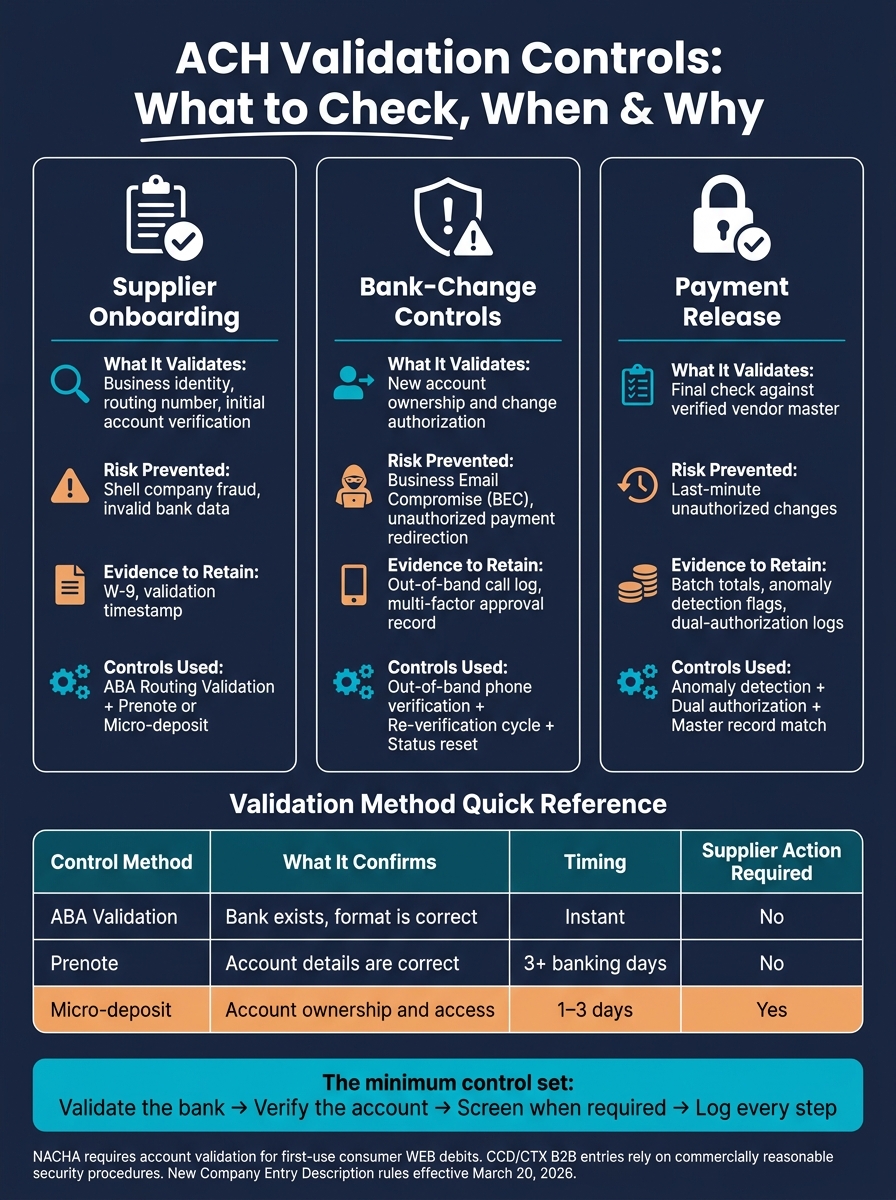
Basic routing checks help, but they don’t catch everything. To close the biggest gaps, finance teams should apply these controls at three points: supplier onboarding, bank-detail changes, and payment release.
ABA routing number validation
Every ACH payment starts with a 9-digit ABA routing number. That number should be checked against a current routing directory.
This matters because some banks use one routing number for ACH and another for domestic wires. If a wire routing number ends up in an ACH file, rejection is common. ABA validation confirms that the bank is valid. It does not confirm that the account is open or that it can receive ACH payments.
Account status verification, prenotes, and micro-deposits
Once routing is checked, the next step is to verify the account behind it. There are two main ways to do that: prenotes and micro-deposits.
A prenote is a $0 entry sent to the receiving bank before the first live payment. It should be sent at least three banking days ahead so the receiving bank can confirm the account details and effective date.
Micro-deposits work a bit differently. Two small amounts – usually between $0.01 and $0.50 – are sent to the supplier’s account. The supplier then confirms the exact amounts, which shows they have access to the account.
| Control Method | What It Confirms | Timing | Supplier Action Required |
|---|---|---|---|
| ABA Validation | Bank exists, format is correct | Instant | No |
| Prenote | Account details are correct | 3+ banking days | No |
| Micro-deposit | Account ownership and access | 1–3 days | Yes |
When OFAC screening and bank-change verification apply
Sanctions screening is separate from bank-data validation. Its job is to check whether the payment recipient appears on U.S. sanctions lists. If screening fails, or if bank details are still unverified, the payment should go on a compliance hold.
Bank-change verification is where many AP teams face the most risk. A vendor’s new bank details or ACH authorization shouldn’t be treated like a simple profile edit. It should trigger a full re-verification cycle.
A good rule here is simple: verify the change by calling a known vendor contact at a phone number already on file. That extra step can stop a bad update before money goes out the door.
Systems should also reset the vendor’s “Approved” status when bank information changes so a new prenote is generated. And when a request comes in marked urgent, that’s not a reason to move faster without checks. It’s a reason to slow down and look harder.
Next, those controls need to be embedded in the AP workflow.
What NACHA requires versus what is recommended
NACHA doesn’t ask for the exact same validation on every ACH entry type. It sets the floor. Your AP controls are what help payments move safely and land in the right account. That’s why it helps to separate what NACHA requires from the extra checks AP teams should put in place.
Validation requirements for relevant ACH use cases
NACHA requires account validation for first-use consumer WEB debits. For CCD and CTX B2B entries, validation is handled through commercially reasonable security procedures instead of one fixed validation method.
As of March 20, 2026, NACHA also requires standardized Company Entry Description values. That includes “PURCHASE” for applicable entries, “PAYROLL” for wage credits, and “PENSION” for retirement benefit payments.
Recommended controls that strengthen compliance posture
The minimum standard is only part of the picture. AP teams should also use routing validation, prenotes or micro-deposits during onboarding, OFAC screening where relevant, and out-of-band verification for bank-detail changes.
Why add these steps? Because they help show that your validation procedures were commercially reasonable. They also cut down ACH returns and lower fraud exposure.
It also pays to keep a clear record of each check:
- when validation ran
- which method was used
- what result it returned
Comparison of onboarding, change, and payment release controls
The same controls should show up at three moments: onboarding, bank changes, and payment release. Think of it like locking the front door, the side door, and the back door. One lock helps. Three are much harder to get around.
| Control Point | What It Validates | Risk Prevented | Evidence to Retain |
|---|---|---|---|
| Supplier Onboarding | Business identity, routing number, initial account verification | Shell company fraud and invalid bank data | W-9, validation timestamp |
| Bank-Change Controls | New account ownership and change authorization | Business Email Compromise (BEC) and unauthorized payment redirection | Out-of-band call log, multi-factor approval record |
| Payment Release | Final check against the verified vendor master | Last-minute unauthorized changes | Batch totals, anomaly detection flags, dual-authorization logs |
These control points work best when they’re built into ERP-driven onboarding, approval, and release workflows.
How ERP-integrated AP automation applies these controls
ACH validation works best when it sits inside the same ERP workflow that controls supplier setup, bank-detail changes, and payment release. That keeps the process tight and cuts down on gaps between steps. In practice, this shows up in supplier onboarding, bank-change handling, and release controls.
Embedding validation in supplier onboarding and payment workflows
AP Express integrates with Oracle EBS, Oracle ERP Cloud, and JD Edwards to place ACH validation directly into supplier setup and payment release workflows. When a new supplier submits banking details, the system runs checks to verify business identity, account ownership, and ongoing sanctions status before the record is approved for use.
The same approach applies when bank details change. If a supplier updates banking information, the system reruns validation automatically and resets the supplier’s approval status. That means the updated record has to pass the same checks again before it can be used in a payment file.
At payment release, a final check runs against the verified vendor master. Anomaly checks flag payments that drift from normal patterns, such as unusual amounts or off-cycle timing, and route those items for exception review.
Audit trails, exception handling, and segregation of duties
Those workflow checks also need audit evidence and access control. Each validation step creates a timestamped evidence trail for every verification, flag, override, and approval. That makes it easier to support SOX-aligned segregation of duties and simplifies external audits.
Role-based access controls limit who can view or edit sensitive ACH data and PII. Only authorized users can modify bank details or override a flagged exception, and every override is logged.
In ACH processing, bank data should be revalidated at each change event and again at payment release. That workflow design is the minimum operational layer behind safer ACH processing.
Conclusion: Minimum controls for safer, compliant ACH payments
At the point of payment release, these checks are the last line of defense before money leaves your account. ABA routing validation confirms that the routing number is valid, and account verification confirms that the destination account can receive ACH funds.
For new supplier accounts, use prenotes or micro-deposits before sending the first live payment.
Routing validation, by itself, does not prove that the payee is authorized or allowed to receive payment. OFAC screening needs to stand on its own as a separate control.
Once these checks are built into ERP workflows, their value isn’t just in stopping bad payments. It also comes from the trail they leave behind. Log every validation, approval, and override. ERP workflow records support audits and segregation of duties.
The minimum control set is straightforward: validate the bank, verify the account, screen when required, and log every step.
FAQs
What ACH checks does NACHA require?
NACHA does not require specific validation checks for individual bank accounts. Its role is to set the Operating Rules for how ACH payments move and to require organizations to use the standardized NACHA file format for batched electronic transfers.
Checking bank account and routing details falls on the sender. That step helps cut down on errors and fraud. Common internal controls include confirming nine-digit routing numbers and checking account status.
How often should vendor bank details be reverified?
Vendor bank details should be reverified whenever a change is requested. That’s because bank account updates are one of the most common ways payment fraud slips in.
So instead of relying on periodic re-checks, treat every change request as its own controlled workflow.
That workflow should include:
- Validation against internal records
- Secondary verification
- Role-based approvals
- A traceable audit trail with version history and documentation for auditors
In plain terms, don’t treat a bank detail update like a routine admin edit. Treat it like a high-risk event that needs checks, sign-off, and a clear paper trail.
What’s the difference between prenotes and micro-deposits?
A prenote is a $0 ACH transaction used to check whether a vendor’s or employee’s bank account and routing details are set up correctly before you send live payments.
A micro-deposit is a small deposit used to confirm account ownership or access.
Both help cut down on payment errors and fraud. The key difference is simple: prenotes test whether the payment can move through the ACH network, while micro-deposits usually ask the recipient to verify the amount they received.
Related Articles
Complete Guide to Accounts Payable Automation
May 15, 2026 Accounts payable (AP) automation replaces manual tasks like data entry and paper-based...
Touchless Invoice Processing: ROI for AP Teams
June 15, 2026 Manual invoice processing is expensive, slow, and prone to errors. On average,...