
Complete Guide to Accounts Payable Automation
Accounts payable (AP) automation replaces manual tasks like data entry and paper-based workflows with AI-driven systems. It speeds up invoice processing, reduces costs, and improves accuracy by using tools like OCR and automated matching. Businesses save time and money by cutting invoice processing costs from $10–$13.54 to $2–$2.98 and reducing cycle times from 17.4 days to 3.1 days. Automation also minimizes errors, enhances payment accuracy, and integrates seamlessly with ERP systems like Oracle. Key features include AI-powered data capture, digital approval workflows, supplier self-service portals, and fraud detection tools. These changes transform AP processes, making them more efficient and effective.
Benefits of Accounts Payable Automation
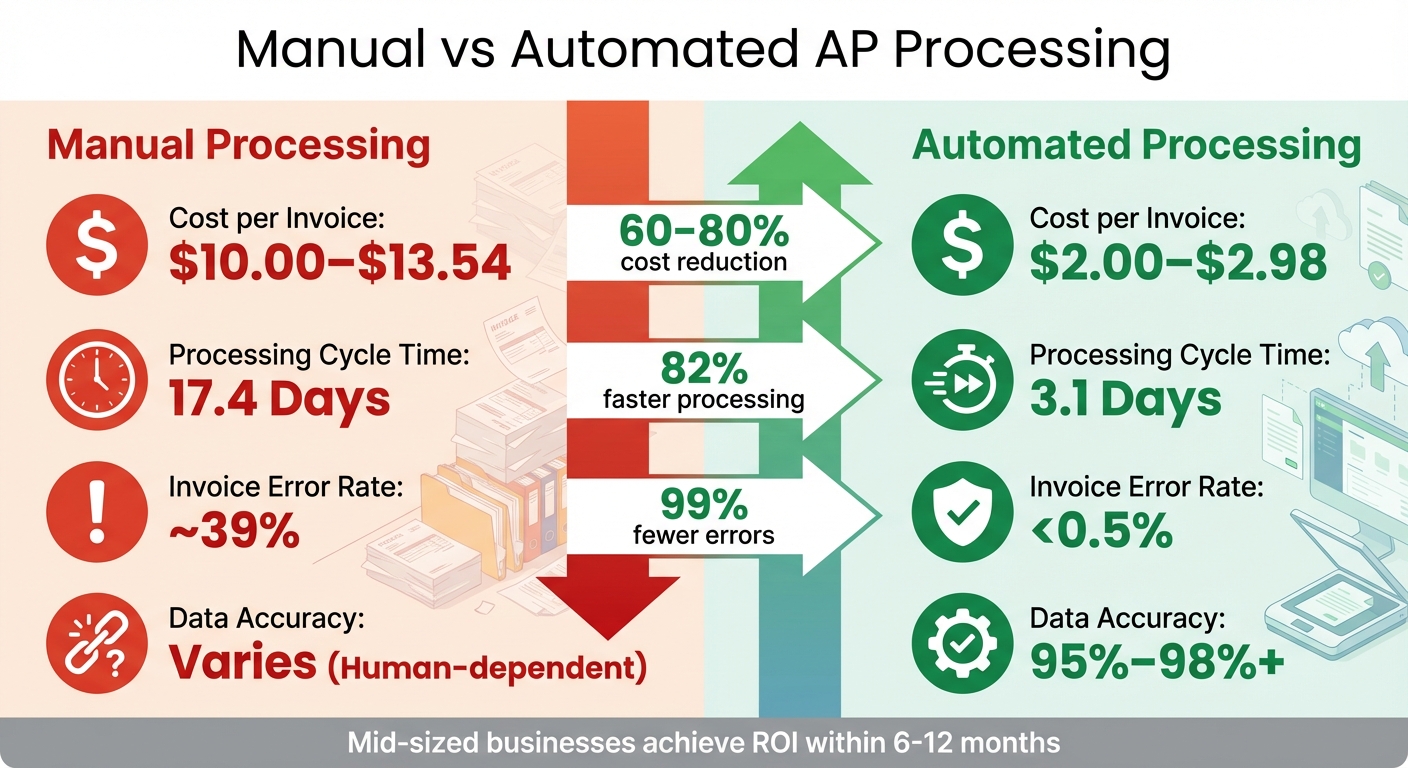
Automating accounts payable (AP) processes brings faster workflows, improved accuracy, and significant cost savings. Over time, these advancements can shift AP from being a reactive cost center to a strategic part of modern systems.
Faster Invoice Processing
Automation replaces tedious manual approval chains with streamlined digital workflows. These systems route invoices based on pre-set rules, sending automatic reminders and escalating overdue approvals as needed. The result? Leading companies process invoices in just 3.1 days on average, compared to the 17.4 days it typically takes with manual systems. This speed helps avoid late payment penalties and ensures teams can take advantage of early-payment discounts.
Mobile approvals further eliminate delays caused by managers traveling or working remotely. Instead of invoices piling up, decision-makers can review and approve payments from anywhere. For example, BlueSnap, an e-commerce payment processor, saved over 10 hours per payment cycle by integrating mobile approvals into its AP system.
Better Accuracy and Fewer Errors
With AI-powered OCR (optical character recognition), accuracy rates exceed 95% within just a month of implementation. Automated three-way matching further enhances accuracy by cross-checking invoices against purchase orders and receiving reports. This process identifies pricing discrepancies, mismatched quantities, and duplicate invoices – issues that manual reviews often miss. Such improvements reduce invoice error rates from nearly 39% in manual systems to less than 0.5%.
Take Nobel Learning Communities, for example. This network of over 180 private schools adopted an AP system with OCR software to handle data entry for invoices and credit memos. By automating the capture of information from scanned and emailed documents, they saved 20 hours per week and eliminated transcription errors.
Cost Savings and ROI
Automating AP processes slashes costs, reducing the expense of processing each invoice from $10.00–$13.54 to just $2.00–$2.98. Mid-sized businesses often see processing cost reductions of 60% to 80%, and most organizations achieve a positive ROI within 6 to 12 months of implementation.
The financial benefits extend beyond labor savings. Automation boosts early-payment discount capture rates by 30% to 35%, and virtual card payments can generate cash-back rebates – sometimes enough to offset the annual cost of the software.
Sarah Janowicz, CFO at Cambio Community, shared her experience: “Our invoice processing doubled from 1,500 to nearly 3,500 bills per month, and automation allowed us to keep up without adding extra workload”.
Granger Construction echoed this sentiment: “You really don’t have to sell anyone on it. It pays for itself”.
| Metric | Manual Processing | Automated Processing |
|---|---|---|
| Cost per Invoice | $10.00–$13.54 | $2.00–$2.98 |
| Processing Cycle Time | 17.4 Days | 3.1 Days |
| Invoice Error Rate | ~39% | < 0.5% |
| Data Accuracy | Varies (Human-dependent) | 95%–98%+ |
These gains not only improve efficiency but also make it easier to integrate seamlessly with Oracle ERP systems.
Core Features of AP Automation Solutions
When choosing an AP automation platform, the right features can transform your accounts payable processes. Key components like AI-driven data capture, supplier self-service portals, and fraud prevention tools are essential building blocks. Together, they streamline workflows, improve vendor relationships, and safeguard your organization from financial risks.
AI-Powered Data Capture and Invoice Matching
Modern AP automation relies on OCR and machine learning technologies, such as neural networks and natural language processing, to turn unstructured invoices into clean, structured data. These systems extract and validate critical details – invoice numbers, dates, vendor names, and line-item specifics – against ERP master data.
Three-way matching ensures invoices align with purchase orders and goods received notes. Any discrepancies outside preset tolerances are flagged for review, while matching invoices proceed directly to payment. This automated process catches pricing errors and duplicate invoices before payments are made.
Over time, machine learning algorithms improve by analyzing past adjustments, making the system more efficient and accurate. With these advancements, organizations can achieve up to 90% touchless invoice processing, where most invoices move from receipt to payment without human involvement.
For example, Norco, an Australian dairy cooperative, processes 300,000 invoices annually and cut invoice-related labor by 50% after adopting AP automation. This allowed their team to focus on building strategic vendor relationships rather than data entry tasks. Similarly, GEMLUX, a marine hardware manufacturer, reduced purchase order processing time from 30–45 minutes to just 3–5 minutes using automated data capture.
“AP automation is technology that automatically captures, validates, and processes invoices so they no longer have to be processed manually, which is notoriously time-consuming and error-prone.” – Maxime Vermeir, Senior Director of AI Strategy, ABBYY
These capabilities lay the groundwork for enhanced supplier interactions through self-service portals.
Supplier Portals and Self-Service Tools
Supplier self-service portals offer vendors 24/7 access to track their invoice status – whether it’s received, approved, or paid – dramatically reducing the volume of “where’s my payment?” inquiries. Suppliers can also submit invoices digitally in formats like PDF, EDI, or XML, eliminating delays caused by paper-based submissions.
Beyond invoice submission, these portals allow suppliers to update their profiles – such as contact information and banking details – without requiring assistance from your AP team. This self-service approach not only reduces administrative workloads but also ensures accurate records, as vendors maintain their own data. Businesses implementing these tools report a 70% drop in vendor inquiries.
For organizations using systems like AP Express integrated with Oracle, these portals sync seamlessly with ERP systems. Supplier documents are automatically retrieved and processed, with exceptions flagged for manual review.
Additionally, these portals help strengthen vendor relationships by offering predictable payment cycles and faster reimbursements. When suppliers can monitor their invoices in real time and resolve issues through built-in communication tools, trust naturally grows. For companies managing high transaction volumes, these portals scale efficiently without adding to the workload of AP staff.
With these tools in place, AP teams can focus on secure operations enhanced by real-time insights and fraud prevention measures.
Fraud Prevention and Real-Time Analytics
AP automation systems actively monitor for risks like duplicate invoices, overbilling, fake vendors, and business email compromise (BEC). Fraud detection tools create detailed audit trails by logging every action taken on an invoice – from receipt to payment – making tax tracking and regulatory audits far simpler.
Real-time dashboards offer visibility into cash flow, spending trends, and KPIs such as average processing time and cost per invoice. Instead of waiting for monthly reports, finance teams can identify bottlenecks as they occur and adjust workflows on the fly. This approach transforms AP departments from reactive cost centers into strategic hubs of insight that inform vendor health and cash flow planning.
Role-based access controls ensure that only authorized personnel can view or edit sensitive banking data, reducing the risk of unauthorized changes. With fraud detection and analytics working together, finance leaders can spot unusual approval times or payment patterns before they escalate into costly problems.
| Feature | Technology | Efficiency Impact |
|---|---|---|
| Data Capture | OCR, AI, Machine Learning | Reduces manual entry and errors |
| Invoice Matching | Rules-based engines | Flags discrepancies early, preventing overpayments |
| Supplier Portal | Web-based self-service | Cuts vendor communication workload by 70% |
| Approval Routing | Workflow automation | Speeds up processes and ensures audit readiness |
| Analytics | Real-time dashboards | Highlights bottlenecks and improves cash flow planning |
For instance, Erste Digital, a banking technology provider, automated invoice and payment slip processing to achieve a 40% increase in document processing efficiency, a 40% reduction in manual errors, and 35% overall cost savings. These results were driven by combining AI-powered capture with real-time monitoring and fraud prevention tools, all working seamlessly together.
Integrating AP Automation with Oracle ERP Systems
Connecting AP Express with Oracle ERP systems – like Oracle E-Business Suite (EBS), ERP Cloud, or JD Edwards – requires a clear, structured approach. While each Oracle platform has its own technical integration methods, the key steps remain the same: evaluate your current workflows, configure the system correctly, and ensure your team is ready to adopt the new processes.
Assessing Current AP Processes
Before diving into integration, take a step back and document your existing accounts payable (AP) workflows. This helps identify problem areas, such as paper-heavy processes, limited visibility into spending, or manual matching of invoices to purchase orders or general ledger codes. Map out how invoices move through your organization – from receipt to approval to payment – and note where delays or errors tend to occur.
Involving key stakeholders at this stage is crucial. Their input can uncover bottlenecks and data quality issues specific to your operations. For example, industries like construction might have unique challenges, such as multi-phase approval chains, that require customized routing rules.
Another critical step is cleaning up vendor data. Standardize invoice formats and verify supplier records to avoid hiccups during migration. Research shows that around 88% of spreadsheets used for balancing accounts contain errors. Taking the time to address these issues now can save you from headaches later when automation goes live.
This groundwork is essential for a smooth transition and ensures that AP Express integrates seamlessly with your Oracle ERP system.
Configuring and Migrating to AP Express
Each Oracle platform has specific integration requirements to ensure smooth operation:
- Oracle E-Business Suite: AP Express integrates using the Payables Open Interface tables and the Payables Open Interface Import program to import external invoice data. It performs real-time lookups to validate invoice details against purchase order numbers stored in the ERP, ensuring accuracy.
- JD Edwards: AP Express works with batch processes to upload data and uses the Batch Voucher Processor Report (R04110ZA) to transfer information into the AP system. It accounts for JD Edwards’ global features, such as alternate currency processing and multilingual supplier communication.
For all platforms, optimize your scanning settings (e.g., TIFF format with CCITT Group IV compression at 300 dpi) and limit any scanned batch sizes to fewer than 25 invoices to maintain speed and efficiency.
Training Teams and Monitoring Performance
Once integration is complete, the focus shifts to training your team and monitoring the system’s performance to maximize the benefits of automation.
Get your AP staff involved early in the process. Show them how automation reduces tedious data entry tasks without replacing their roles. Provide hands-on training for exception handling using tools like the Forms Recognition Verifier, which allows staff to manually review and resolve documents that fail automated extraction due to low confidence levels or unclear sections.
Introduce your team to real-time dashboards, such as the AP Express Dashboard. These tools help them track holds, discounts, and exceptions as they occur. Establish key performance indicators (KPIs) early on to measure the success of the integration. Metrics like invoice cycle time, error rates, and cost per invoice are great starting points.
Keep an eye on the system’s adaptive learning capabilities. Over time, AI-powered validation improves as it learns from human corrections. In the first few months, as your team resolves exceptions, the system becomes more accurate and requires less manual intervention. Advanced Oracle Fusion automation can achieve up to 99.7% touchless capture and 95% touchless processing, but reaching these levels requires consistent monitoring and fine-tuning of workflows.
Best Practices for AP Automation Implementation
Standardize Invoice Formats and Approval Workflows
To streamline your accounts payable (AP) process, start by centralizing all invoices. Whether they come in as paper documents, emails, or electronic files, route them through a single intake point. This approach not only organizes your workflow but also prevents duplicate entries from slipping through the cracks.
Before onboarding vendors, ensure they can submit invoices in the required formats – such as PDF, EDI 810, or XML – and include essential details like purchase order (PO) numbers. Set up your system to perform two-way matching (invoice to PO) or three-way matching (invoice, PO, and receiving report). This setup catches discrepancies automatically, reducing the need for manual intervention.
Another key step is configuring rules-based routing. For example, invoices could flow based on vendor type, department, or dollar amount. Smaller invoices (e.g., under $500) might bypass manager approval, while larger ones (e.g., over $10,000) may require multiple sign-offs. Define cross-department service-level agreements (SLAs) – like processing invoices within two days or responding to queries within three days – to maintain accountability.
An escalation system can also speed up overdue approvals. Start with friendly reminders, then move to daily alerts or involve a manager if deadlines are missed.
At Beyer Mechanical, their AP platform integration was completed in just 48 hours, allowing clerks to process invoices independently the following day.
This kind of rapid success is possible when workflows are standardized right from the beginning.
Capture Early-Pay Discounts and Use Supplier Self-Service
Once your workflows are standardized, shift your focus to maximizing the benefits of automation, such as capturing early-payment discounts and enabling supplier self-service.
Quick invoice entry is key to taking advantage of early-payment discounts. Automated matching systems flag discrepancies immediately, ensuring delays don’t cause you to miss out on these opportunities. Mobile approval tools can further eliminate bottlenecks by allowing stakeholders to review and approve invoices from anywhere.
Supplier self-service portals can significantly reduce the workload for your AP team while improving relationships with vendors. These portals let suppliers check invoice statuses, upload documents, and get payment updates without needing to contact your team directly. This transparency not only builds trust but also cuts down on “Where’s my payment?” calls, freeing up your staff for more critical tasks.
To ensure smooth adoption of these portals, create a vendor onboarding plan that includes clear, concise training materials. Group vendors based on their behavior – for instance, segment high-volume, low-error vendors separately from those generating frequent exceptions. This allows you to tailor communication and automation strategies for better results.
The financial impact of automation is hard to ignore. Manual invoice processing costs between $12 and $30 per invoice, while automation can bring that down to $2 to $4. Best-in-class systems can lower it even further, to about $2.81 per invoice. Additionally, automation reduces Days Payable Outstanding (DPO) by an average of 5.55 days.
By implementing these strategies, you’ll create a foundation for continuous improvement driven by analytics.
Use Analytics for Continuous Improvement
After establishing streamlined workflows and vendor integrations, analytics can help you refine your AP process even further. Use data to identify where invoices are getting stuck – whether it’s a specific department, manager, or vendor causing delays. Research shows that 80% of invoice exceptions often come from just 20% of vendors or approvers. Addressing these outliers can lead to significant improvements.
Generate monthly reports to track recurring issues and focus your training efforts accordingly. Weekly checks can ensure that automation rules are functioning as expected.
Keep an eye on key performance indicators (KPIs) like average processing time per invoice, percentage of exceptions, early-payment discounts captured, payment error rates, and DPO. While the median cost to process an invoice with automation is $2.80, organizations relying on manual methods can spend $6.00 or more. Monitoring these metrics helps you measure the return on your automation investment.
Analytics can also uncover patterns that might otherwise go unnoticed, such as duplicate invoices, sudden spikes in billing from a single vendor, or suspiciously similar invoice details. Instead of just fixing individual issues, look for systemic problems through root cause analysis. This approach prevents recurring errors and highlights areas where processes or requirements need clarification.
At Spanish Fork City, Finance Director Jordan Hales introduced an AI-driven AP system that learned approval preferences, such as which managers handled specific invoice types. Initially, the AI provided suggestions that staff could override, building trust in the system over time.
This gradual, data-supported adoption helped the team embrace automation without feeling displaced, showing how analytics can guide both process improvement and cultural acceptance of new technology.
Conclusion: Transform Your Accounts Payable with Automation
Automation in accounts payable (AP) is more than just a way to save money – it’s a game-changer for your financial operations. By automating, you can reduce invoice processing costs from $10.18 to as little as $2.00 per invoice. Cycle times shrink dramatically, from 10.9–17.4 days down to just 3.1–3.7 days. Error rates plummet from nearly 39% to under 0.5%, and your team can reclaim 40% of their time for more strategic tasks.
AP Express takes these benefits further by integrating seamlessly with Oracle EBS, ERP Cloud, and JD Edwards. This platform combines AI-powered data capture with over 98% accuracy, automated three-way matching, and dynamic approval workflows. All of this is synced in real-time with your ERP system, ensuring smooth and efficient operations.
The shift to automation transforms AP from a cost-heavy function into a strategic asset. With up to 90% touchless processing and 70% fewer vendor inquiries, your team can focus on optimizing cash flow and building stronger supplier relationships.
FAQs
How does AP automation work with ERP systems like Oracle?
AP automation tools like AP Express work effortlessly with Oracle’s cloud ERP, thanks to Oracle Integration Cloud. When an invoice arrives, the system uses OCR technology to scan and extract key details, automatically creating draft invoices within Oracle’s ERP. At the same time, it updates the payables ledger in real time. If there are issues – like missing details or mismatched totals – the system flags them and sends them to your AP team for review. This process helps ensure accuracy, provides full audit trails, and eliminates the need for manual data entry.
Additionally, Oracle Integration Cloud allows AP Express to optimize the entire procure-to-pay cycle using pre-built APIs. This integration handles tasks such as purchase-order matching, approval routing, and payment execution, all while keeping Oracle’s financial modules in sync in real time. By taking advantage of Oracle’s native tools, businesses can sidestep the compatibility headaches of older systems and enjoy a smoother, more connected workflow.
What should I look for in an accounts payable automation solution?
When selecting an accounts payable (AP) automation solution, it’s essential to focus on features that simplify the entire invoice-to-payment process. Tools like digital invoice capture – often powered by OCR technology – can accurately extract data from PDFs or scanned invoices, while auto-coding automatically assigns GL accounts and cost centers, minimizing manual work.
An effective solution should offer end-to-end workflow automation, which can route invoices for review, manage multi-level approvals, and handle three-way matching with purchase orders and receipts. Look for integrated payment options – such as ACH, credit card, virtual card, or check – and automatic reconciliation with your bank to enable smooth, touch-free payment processing. Real-time dashboards and analytics provide valuable insights into spending patterns, approval times, and exceptions, while a detailed audit trail helps maintain compliance. Additionally, seamless ERP integration (e.g., with Oracle) ensures your accounting system stays updated without the need for duplicate data entry.
For even greater efficiency, consider advanced features like AI-driven exception handling, a supplier portal for centralized invoice management, and problem-source tracking to identify recurring issues. Security is also critical – look for solutions with encryption, role-based access controls, and configurable approval rules to reduce fraud risks and enforce company policies. By combining these tools, you can lower processing costs, shorten payment cycles, and gain better visibility into cash flow.
How does accounts payable automation lower invoice processing costs and reduce errors?
Accounts payable (AP) automation slashes invoice processing costs by replacing outdated, paper-heavy tasks with streamlined digital workflows. Tools like electronic invoice capture and AI-driven data extraction take over tedious jobs such as manual data entry, verification, and reconciliation. The result? Businesses can cut the average cost per invoice – often $15 or more – down to just a small fraction. Plus, faster processing means earlier payments, which can boost cash flow without the hassle of managing physical paperwork.
Automation also reduces errors by applying consistent rules to processes like three-way matching, exception handling, and approval routing. Built-in validation checks flag discrepancies before they make it into your financial records, and digital audit trails offer instant insight into any issues. These features help prevent duplicate payments, mismatches, and data-entry mistakes, saving finance teams valuable time while improving accuracy and delivering a strong return on investment.
Related Articles

Advantages of Being in the Early Majority for AP Automation
January 25, 2022 This is the third installment in series of blog posts regarding the...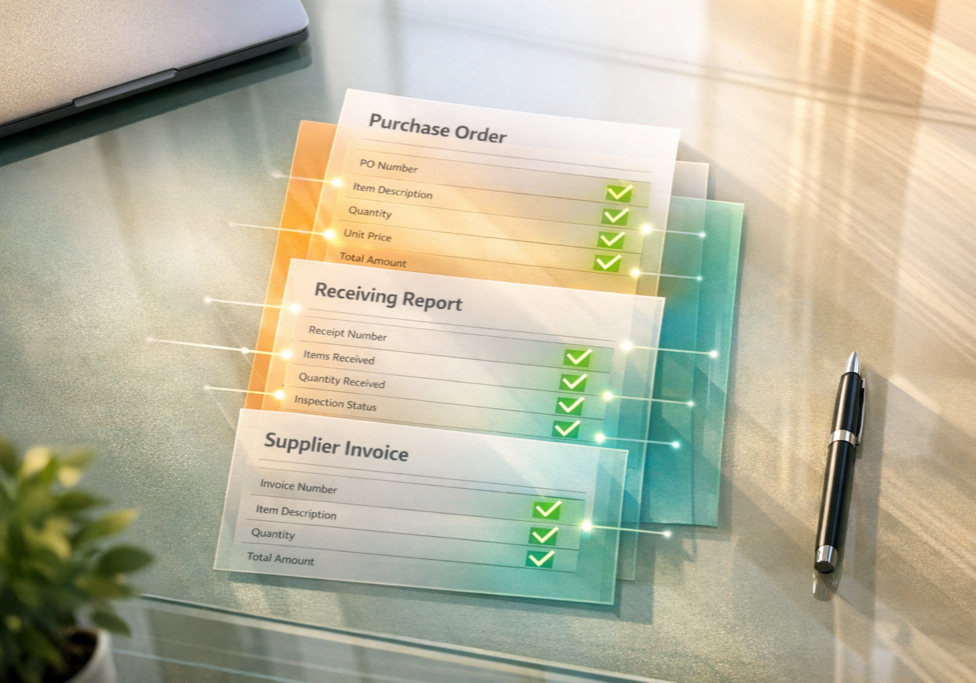
What Is Three-Way Matching in Accounts Payable?
June 2, 2026 Three-way matching is a process in accounts payable that verifies supplier invoices...