What Is Three-Way Matching in Accounts Payable?
Three-way matching is a process in accounts payable that verifies supplier invoices by comparing three key documents: the Purchase Order (PO), the Receiving Report (Goods Receipt Note), and the Supplier Invoice. This ensures businesses only pay for what was ordered, delivered, and billed correctly, reducing errors and preventing fraud.
Key Benefits:
- Prevents Overpayments: Ensures payment is made only for delivered and approved goods or services.
- Reduces Errors: Catches issues like incorrect prices, duplicate charges, or mismatched quantities.
- Fraud Protection: Protects against fake or inflated invoices, a problem costing companies millions annually.
How It Works:
- PO Creation: The procurement team issues a purchase order detailing items, prices, and terms.
- Receiving Report: The warehouse confirms delivery, item condition, and quantity.
- Invoice Verification: Accounts payable compares the supplier’s invoice against the PO and receiving report. Any discrepancies are flagged and resolved before payment.
Automating this process with tools like AP Express simplifies the workflow, reduces manual errors, and speeds up invoice processing. By integrating with systems like Oracle ERP, businesses can ensure accuracy and efficiency in their accounts payable operations.
Accounts Payable Process: Three-Way Match Accounting
The 3 Documents in Three-Way Matching
Three-way matching relies on three essential documents to confirm that orders, deliveries, and invoices align perfectly. By understanding these documents and their roles, you can avoid overpayments and costly mistakes. Let’s break down how each contributes to financial accuracy.
Purchase Order (PO)
The Purchase Order (PO) is where everything begins. It’s a formal agreement that outlines exactly what’s being ordered – item descriptions, quantities, prices, delivery timelines, and payment terms. Each PO comes with a unique tracking number, tying the entire transaction together. This document acts as your first line of control, ensuring that payments are made only for goods or services that were approved and priced at pre-negotiated rates.
Receiving Report (Goods Receipt Note – GRN)
The Receiving Report, often called the Goods Receipt Note (GRN), confirms the arrival of items or the completion of services. It details the quantities received, the condition of the goods, and the delivery date, all while linking back to the PO. For services, it verifies that the agreed deliverables were fulfilled. This report acts as the second checkpoint, helping you avoid paying for items that were never delivered, arrived damaged, or were incomplete. Key details include the PO number, vendor name, product descriptions, quantities, and any notes about quality. By comparing this report with the PO and the supplier’s invoice, you can be confident that your inventory reflects exactly what was ordered and received.
Supplier Invoice
The Supplier Invoice is the vendor’s official request for payment. It lists the items or services provided, the quantities, unit prices, and the total amount due. Before payment is approved, this invoice is cross-checked against both the PO and the Receiving Report. During this process, confirm that the billed quantities and prices match the PO and that the quantity invoiced doesn’t exceed what was received. This thorough comparison ensures payment is made only for acceptable goods or services, making three-way matching a powerful tool for catching errors or even potential fraud.
How Three-Way Matching Works
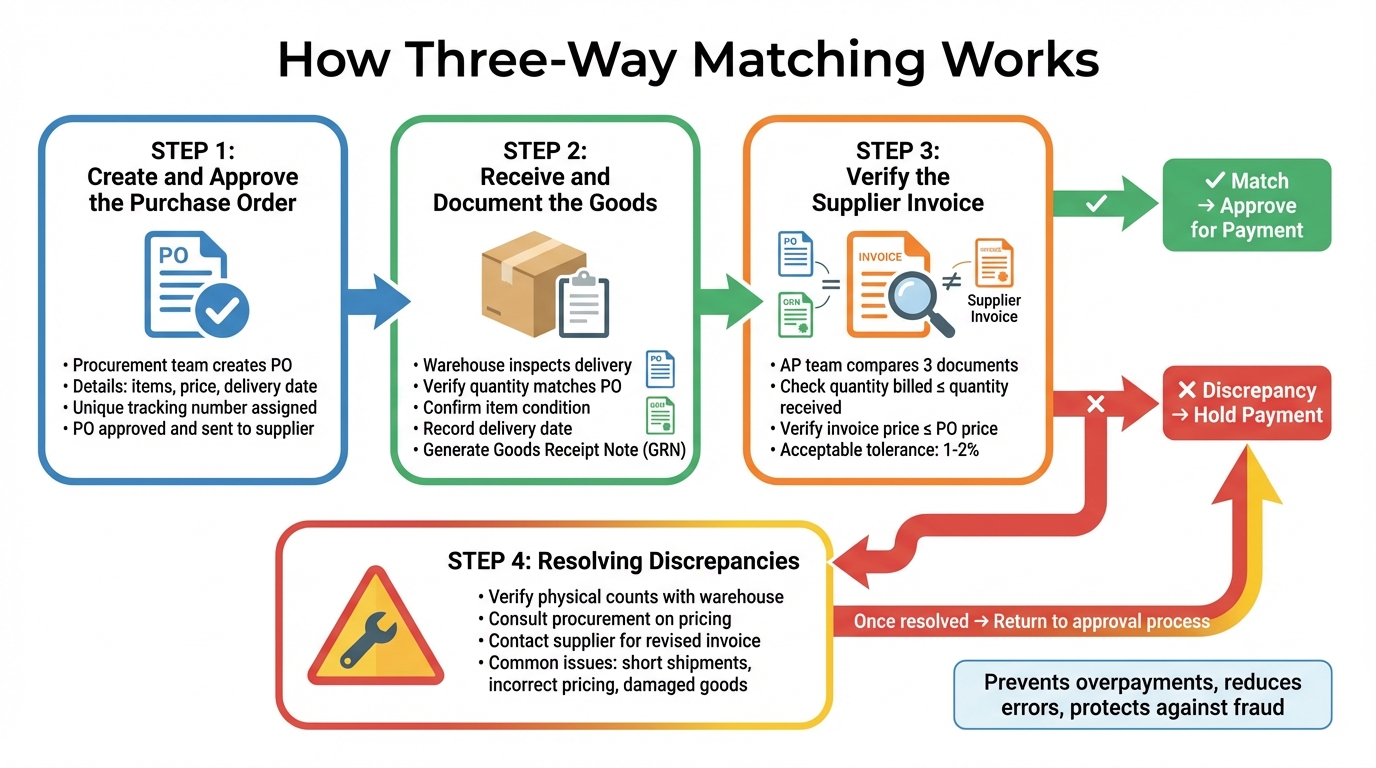
Once the necessary documents are prepared, the three-way matching process kicks off. This method ensures that only accurate and approved transactions move forward for payment. It follows a structured sequence, starting with the purchase order and ending with either payment approval or a hold if something doesn’t align.
Step 1: Create and Approve the Purchase Order
The process begins with the procurement team creating a purchase order (PO). This document acts as a formal agreement with the supplier, outlining the items being purchased, the agreed-upon price, and the expected delivery date. Each PO is assigned a unique tracking number. Once the PO is approved by the appropriate authority, it’s sent to the supplier. This step ensures that only pre-approved purchases make it into the system, serving as a safeguard against unauthorized or fraudulent invoices.
Step 2: Receive and Document the Goods
When the goods arrive, the warehouse team inspects the delivery and generates a receiving report (or Goods Receipt Note). They check that the quantity matches the PO, confirm the condition of the items, and record the delivery date. This report is tied back to the original PO, creating a clear record of what was actually delivered. This verification step is crucial – it prevents payments for items that were never delivered or arrived damaged. Once the goods are documented, the process moves on to verifying the supplier invoice.
Step 3: Verify the Supplier Invoice
The accounts payable team takes over, comparing the supplier invoice against both the PO and the receiving report. They confirm that the quantity billed matches or is less than the quantity received and that the invoice price doesn’t exceed what was agreed upon in the PO. If everything checks out and falls within acceptable tolerances – typically a small margin like 1-2% – the invoice is approved for payment. If discrepancies arise, the system places a hold on the invoice to block payment until the issue is resolved.
Resolving Discrepancies
When the numbers don’t match, the accounts payable team steps in to investigate. They may verify physical counts with the warehouse, consult with procurement about pricing adjustments, or contact the supplier to request a revised invoice or credit memo. Common issues include short shipments, incorrect pricing, or damaged goods. Once the problem is resolved – whether through a corrected invoice, supplier credit, or internal adjustment – the hold is lifted, and the payment can proceed.
Automating Three-Way Matching with AP Express
Taking the manual three-way matching process to the next level, automation with AP Express significantly boosts both accuracy and efficiency. By digitizing the workflow, AP Express eliminates the errors that often come with manual data entry. Using AI-powered OCR technology, the platform quickly extracts data from both paper and electronic invoices, capturing details like PO numbers, quantities, prices, and line items. These details are then seamlessly integrated into the matching process, creating a streamlined and error-resistant system.
How AP Express Simplifies the Matching Process
After invoice data is captured, AP Express compares it against the Purchase Order and Receiving Report based on predefined criteria. The system ensures that quantities and prices align within acceptable tolerances before moving invoices forward for payment authorization. If everything checks out, invoices proceed through Straight-Through Processing (STP). When discrepancies are detected, the platform automatically flags them and routes these exceptions to the right person – whether it’s the buyer, warehouse team, or supplier – ensuring the approval process doesn’t hit unnecessary roadblocks.
Integration with Oracle ERP Systems
AP Express connects directly with Oracle EBS, ERP Cloud, and JD Edwards, pulling real-time purchase order and receiving data while pushing approved invoices back into the ERP for payment. This integration allows businesses to maintain their existing Oracle workflows while supporting various matching methods, including two-way, three-way, and even four-way matching, which incorporates inspection or acceptance documents. This ensures that the rigorous standards of three-way matching are upheld without disrupting your current processes.
Features and ROI Advantages
The platform’s integration capabilities pave the way for additional tools that deliver measurable benefits. AP Express includes features like invoice digitization, a supplier self-service portal, and advanced fraud prevention mechanisms. These fraud prevention tools reduce the risk of fraudulent invoices by ensuring every payment is tied to a valid purchase order and proof of delivery. Beyond fraud reduction, faster processing can help businesses take advantage of early payment discounts and avoid penalties for late payments, directly improving financial outcomes. ROI can be tracked through metrics like cost per invoice, error rates, and audit readiness, as the system keeps detailed logs of every matching and approval action.
Common Discrepancies and How to Fix Them
Types of Discrepancies
Even with a solid three-way matching process in place, discrepancies can still slip through the cracks. These mismatches need to be spotted and addressed quickly to avoid larger issues. One of the most frequent problems is quantity discrepancies. For instance, an invoice might charge for 100 units, but the receiving report only accounts for 95. This kind of mismatch often comes from partial shipments, counting mistakes in the warehouse, or suppliers delivering fewer items than ordered.
Price variances are another common issue. These occur when the unit price on the invoice doesn’t match the purchase order. Reasons for this can include unauthorized price changes, keying errors, or unexpected costs like shipping fees or currency adjustments. Missing documentation also causes delays when a key document – like the purchase order, receiving report, or invoice – is unavailable in the system.
Damaged or failed-inspection items can also lead to discrepancies by reducing the acceptable quantity for billing. Manual errors, such as misreading numbers, transposing digits, or using incorrect general ledger codes, are another source of mismatches. In more serious cases, these errors might even hint at fraud, such as inflated prices, duplicate invoices, or fake invoices from scammers pretending to be legitimate suppliers.
Steps to Resolve Discrepancies
Resolving discrepancies effectively is crucial to keeping an automated accounts payable system running smoothly. The first step when a mismatch is flagged is to verify the issue. For quantity problems, the warehouse team should perform a physical recount to figure out whether the error happened internally or with the supplier. If it’s a price variance, check the original purchase order and get in touch with the vendor to confirm the correct amount or request an updated invoice. For damaged goods, you might need to withhold payment until the supplier issues a credit memo or sends replacements.
Clear communication between departments is key to resolving these issues. Procurement teams can confirm purchase order details, warehouse staff can verify counts, and accounts payable can ensure the documentation is corrected. To avoid unnecessary delays over minor issues, consider setting tolerance thresholds – like automatically approving variances within 2–3%.
Platforms like AP Express make these steps even easier by automating exception handling. The system flags discrepancies and routes them to the right person, whether that’s the buyer, warehouse manager, or supplier. It also uses automatic retry logic to recheck invoices against receiving data over a few days, which helps account for delayed warehouse updates or partial deliveries, cutting down on false positives. Plus, its centralized dashboard lets accounts payable staff view the purchase order, receiving report, and invoice side by side, making it much simpler to identify and resolve issues quickly. This level of automation ensures the accounts payable process stays accurate and efficient.
Conclusion
Three-way matching ensures secure payments by aligning purchase orders, receiving reports, and supplier invoices. By cross-checking these documents, businesses confirm they’re paying only for items that were ordered, received, and correctly priced. This process not only provides a clear audit trail but also protects against risks like fraudulent invoices and duplicate payments. Errors and fraud in billing can pose serious financial risks. Automating this process significantly improves efficiency and accuracy.
Manual invoice processing is both expensive – costing up to $24 per invoice – and error-prone. Automation, on the other hand, can bring the error rate in accounts payable close to 0% and process invoices roughly 2.4 times faster than manual methods.
With AP Express, these tasks are streamlined through automation. Using AI-powered OCR, AP Express automates three-way matching with 99% data accuracy and real-time processing. Any discrepancies are flagged immediately and routed for resolution, ensuring a smooth and efficient workflow. By addressing common challenges, AP Express reduces errors and accelerates processing times.
“The automatic 3-way purchase order match and invoice reconciliation process has been a ‘huge advantage and time-saver'”
- Finance Manager at WeWork
FAQs
How does three-way matching help prevent invoice fraud?
Three-way matching is a process designed to safeguard businesses against invoice fraud by cross-checking three critical documents: the purchase order, the supplier invoice, and the receiving report. This method ensures payments are only made for goods or services that were properly ordered, delivered, and billed.
By identifying inconsistencies – like unauthorized invoices, duplicate charges, or undelivered items – three-way matching serves as a protective measure against mistakes and fraud. Automating this process with tools such as ERP systems can improve precision and make workflows more efficient.
How does automation improve the three-way matching process in accounts payable?
Automation takes the traditionally tedious task of three-way matching and turns it into a faster, more efficient process. By digitizing key documents like purchase orders, invoices, and receiving reports, automated systems can instantly cross-check details such as quantities, prices, and delivery terms. Any mismatches are flagged for review, which not only speeds up the workflow but also minimizes the chances of errors and fraud.
Many ERP systems, including Oracle Payables, are designed to handle three-way matching automatically. These systems can apply tolerance rules without the need for manual oversight. The result? Quicker invoice processing, fewer payment delays, stronger fraud safeguards, and better relationships with vendors. Automation makes three-way matching a more precise and dependable solution for today’s accounts payable teams.
What are the most common issues in three-way matching, and how can they be fixed?
Common problems with three-way matching often include data mismatches, timing delays, and procedural errors. For instance, a data mismatch might happen when the purchase order (PO), receipt, and invoice don’t match up on things like quantities or prices. Imagine an invoice listing 10 units at $25 each, while the PO approved 12 units at $24 each – this kind of discrepancy can create confusion. Timing delays occur when one of the documents, like a receipt, hasn’t been logged into the system before the invoice arrives. Procedural errors, on the other hand, can stem from manual entry mistakes, missing PO numbers, or disagreements with vendors about what was delivered versus what was billed.
To address these issues, companies rely on a mix of system controls and exception workflows. Automated systems can clear small differences within predefined tolerances automatically, while larger mismatches are flagged for further review. If documents are missing, the system alerts the accounts payable team to follow up and gather the needed information. Tools like OCR (optical character recognition) help minimize manual entry mistakes, and workflows are designed to track and resolve disputes efficiently. These practices not only improve accuracy but also help prevent overpayments and ensure compliance with financial regulations.
Related Articles

Top 7 Benefits of Oracle ERP AP Integration
June 22, 2026 Oracle ERP AP integration connects accounts payable systems directly to Oracle ERP...
Invoice Processing Automation Overview
July 27, 2026 If you still process invoices by hand, you're likely paying too much...