Oracle AP Touchless Processing Checklist
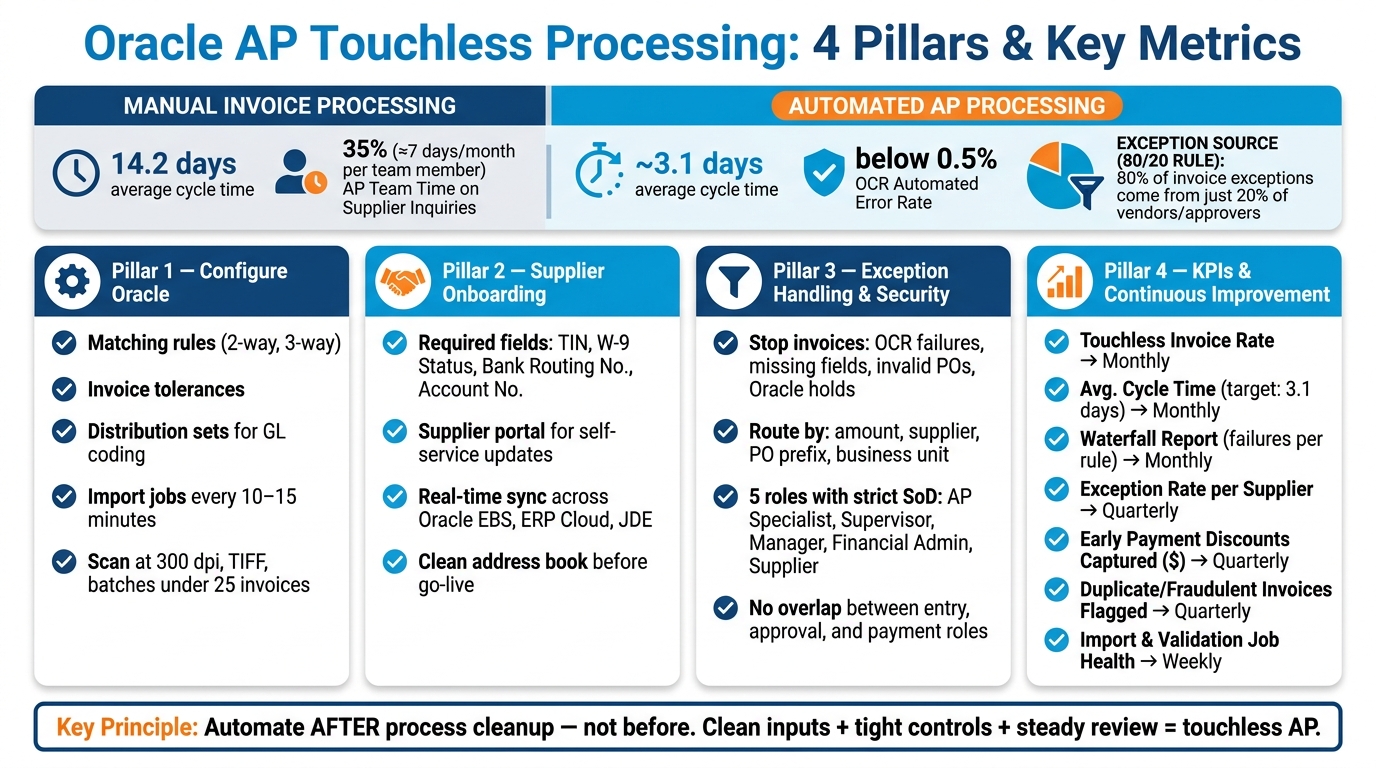
If you want touchless AP to work in Oracle, focus on four things first: setup, supplier data, exception routing, and KPI reviews. That’s the short version. When those four areas are in shape, invoices are far more likely to move from receipt to payment without AP stepping in.
Here’s the core takeaway in plain English:
- You need matching rules, tolerances, import jobs, and default coding set up correctly.
- You need clean supplier records with U.S. tax and payment data like TIN, W-9 status, bank routing number, and account number.
- You need clear hold rules, approval paths, and role separation so the right people handle the right issues.
- You need to track touchless rate, cycle time, supplier-driven exceptions, duplicate invoice flags, and job health on a set schedule.
The article also makes one point very clear: automation should come after process cleanup, not before it. If supplier records are messy, approval rules are unclear, or Oracle roles overlap, touchless AP will create more manual work instead of less. That matters when manual invoice processing still averages 14.2 days, while automated AP can cut cycle time to about 3.1 days.
For U.S. teams, also keep an eye on a few local items from day one:
- 1099 reporting
- W-9 collection
- USD ($) payment and reporting
- Month-end close timing
If I had to boil the checklist down to one line, it would be this: clean inputs, tight controls, and steady review drive touchless AP.
Checklist 1: Configure Oracle for Touchless Invoice Processing
Set up matching, intake, and scheduling first. Those three controls decide if invoices move through on their own or get stuck in exceptions. If these settings are off, even clean invoices can end up in manual review.
Matching Rules, Tolerances, and Default Coding
Matching and tolerance settings are what drive touchless AP.
| Setting | What it does |
|---|---|
| Two-way matching | Matches the invoice to the PO |
| Three-way matching | Matches the invoice to the PO and receipt |
| Distribution sets | Automatically assign GL accounts and cost centers for non-PO invoices |
| Invoice tolerances | Define how much variance is allowed before an invoice is flagged for exception handling |
Start with tighter tolerances, then use waterfall reports to see which rules are causing the most failures and loosen them step by step. That approach keeps you from opening the floodgates too early.
Once those rules are in place, invoice capture needs to be clean. AP Express has a 90% capture accuracy rate out of the box. Otherwise, bad data goes in and bad results come out.
Invoice Import, Imaging, and Job Scheduling
Clean capture gives Oracle better data to work with.
Capture these fields:
- PO number
- Supplier name
- Invoice number
- Invoice amount
- Invoice date
Oracle EBS uses the Payables Open Interface tables and Import program. Oracle ERP Cloud uses BPEL Process Manager for routing. Run import jobs every 10 to 15 minutes to keep invoices moving.
Confirm:
- Company and business unit setup
- Supplier address book records
- Accounts, POs, and receipts alignment
- Alternate currency support
Keep suppliers, POs, and receipts synced in real time so tables stay aligned and batch imports stay reliable.
Checklist 2: Supplier Onboarding and Exception-Free Intake
Supplier data errors can stop an invoice before matching even begins. If a supplier’s tax ID is missing or bank details are wrong, the invoice gets stuck. That’s why onboarding matters so much. When supplier data is clean from day one, you cut down intake exceptions before they ever hit matching or approval.
Supplier Master, Portal Access, and Tax and Banking Data
Every supplier record should be complete and verified before the first invoice comes in. If it’s not, AP ends up dealing with holds, back-and-forth emails, and manual cleanup.
| Required Field Category | Specific Oracle/JDE Data Fields | Purpose in Touchless Processing |
|---|---|---|
| Identity | Supplier Name, Site, Business Unit | Routes the invoice to the correct legal entity |
| Tax/Compliance | Tax Registration No., TIN, W-9 Status | Prevents legal holds and keeps tax data accurate |
| Payment | Bank Routing No., Account No., Payment Method | Supports automated payments |
| Communication | Email Address, Portal Login | Enables automated notifications and self-service |
Suppliers should upload their W-9 and any other verification documents during onboarding, before the first invoice is processed. It also helps to confirm that default payment methods are already in place.
The average AP team spends 35% of its time – roughly seven days a month per team member – responding to supplier inquiries about data verification, payment status, and discrepancies. A supplier portal moves much of that work back to the supplier, where it should sit.
AP Express Intake and Supplier Self-Service

AP Express syncs supplier master data in real time across Oracle EBS, ERP Cloud, and JD Edwards, while keeping Oracle as the system of record. Suppliers can sign up through the self-service portal and submit basic company details and banking data right away.
Once the connection is set, AP Express pulls invoice header fields automatically, including PO number, supplier name, invoice number, amount, and date. Suppliers can send invoices by email, scanning, secure FTP, or direct portal upload, which removes hand-keying from the process. They can also check payment status and update their own banking and contact details without reaching out to AP.
Before go-live, check a few intake points:
- Confirm that required U.S. onboarding fields – TIN, W-9 status, bank routing number, and account number – are enforced at supplier registration
- Check that supplier names, supplier sites, and business unit assignments in AP Express match Oracle records exactly
- Clean the Oracle address book before syncing; duplicate or outdated records create intake exceptions
Once supplier records are clean, exceptions can go to review instead of being fixed at intake.
Checklist 3: Exception Handling, Security, and Workflow Routing
After clean intake, routing becomes the next place where touchless processing can fall apart. Good supplier data cuts down intake errors, but some invoices will still fail validation. When that happens, the job is simple: send each exception to the right queue without slowing the rest of invoice flow.
Exception Queues, Holds, and Approval Paths
Some exceptions should stop an invoice cold. Others just need to be sent somewhere else.
Invoices with invalid dates, missing fields, nonexistent PO numbers, or Oracle Price, Quantity Received, Quantity Ordered, or Receipt Holds should be stopped.
Invoices that meet a rule can be routed on their own based on amount, supplier, PO prefix, or business unit. Send those invoices to a group rather than one person – for example, an AP specialist group – so work doesn’t pile up when someone is out.
When matching rules and supplier data are in good shape, most of what’s left should be actual exceptions, not intake mistakes.
Use a waterfall report to spot which routing rules create the most holds. Then adjust those rules so they’re not too tight or too loose.
The table below shows how queue design choices shape day-to-day exception handling:
| Exception Handling Aspect | Centralized / Stricter Routing | Segmented / Simplified Routing |
|---|---|---|
| Queue Ownership | One AP team owns all exceptions | Routed by business unit, supplier, or PO prefix |
| Validation | Manual review for OCR data | Auto-validation against ERP; only failures stop |
Once those routing rules are in place, the next step is locking down who can release holds, change data, and approve invoices.
Roles, Segregation of Duties, and Supplier Access
Access controls help protect touchless processing from fraud and from needless manual slowdowns. Use role-based security to separate AP specialists, supervisors, managers, and financial application administrators.
| Role | Primary Authority | Key SoD Control |
|---|---|---|
| AP Accounts Payable Specialist | Data entry, OCR verification, and initial coding; cannot approve own entries or execute payments. | Cannot approve own entries or execute payments |
| AP Accounts Payable Supervisor | Releasing holds, overriding matches, exception routing | Oversight of specialist queues; limited payment authority |
| AP Accounts Payable Manager | High-value approvals, rule set tuning, audit review | Final approval authority; separated from data entry |
| Financial Application Administrator | Configuring roles, workflow rules, and security | No authority to enter or approve invoices |
| Supplier | Updating own profile data via portal | Changes must be validated and approved by AP staff |
Before go-live, check a few things:
- Confirm that invoice entry, approval, and payment execution sit in separate roles with no overlap.
- Verify that AP Specialists can’t release their own holds or approve invoices they entered.
- Limit supplier edits to approved fields, and require AP review for bank and tax changes.
- Run a random audit of touchless invoices to check accuracy and rule set integrity.
Holds, overrides, and reroutes should all be tracked so the next checklist can show whether the process is getting better.
Checklist 4: KPIs, Reporting, and Continuous Improvement
Tracking holds and overrides from Checklist 3 only shows part of what’s going on. KPIs tell you if touchless processing is getting better or starting to drift. Use the metrics below to check whether the rules and routing choices from the earlier checklists are cutting manual work.
Oracle and AP Express Reporting Checkpoints
The one number to watch most closely is your touchless invoice rate: invoices processed without manual intervention divided by total invoices received. Put that next to your exception rate by supplier, which often follows the 80/20 rule: roughly 80% of invoice exceptions come from just 20% of vendors or approvers.
Speed matters. Quality matters too. Faster processing doesn’t help much if exception rates start climbing.
| Metric | What It Tells You | Review Frequency |
|---|---|---|
| Touchless Invoice Rate | How well your automation rules are working overall | Monthly |
| Average Invoice Cycle Time (Days) | Time from receipt to payment; automation can cut cycle time to about 3.1 days | Monthly |
| Waterfall Report (Failures per Rule) | Which matching rule is causing the most holds | Monthly |
| Exception Rate per Supplier | Which vendors are driving the most manual work | Quarterly |
| Early Payment Discounts Captured ($) | The dollar impact of shorter cycle times | Quarterly |
| # of Fraudulent/Duplicate Invoices Flagged | Risk caught before payment goes out | Quarterly |
| Import & Validation Job Health | Whether the pipeline, such as Payables Open Interface Import, is running cleanly | Weekly |
The Waterfall report is where things get practical. Use it to rank the rules that cause the most failures. That gives you a clear path: adjust the rule that keeps breaking first instead of taking a guess.
AP managers can also review Oracle and AP Express data together. Watch for touchless invoices that get canceled after approval but before payment execution. If that number jumps, your rules are often too loose. It also helps to audit a sample of touchless invoices to check OCR accuracy; automated error rates can fall below 0.5%.
Conclusion: The Oracle AP Touchless Checklist at a Glance
Touchless AP in Oracle depends on clean configuration, disciplined controls, and steady measurement. Review these KPIs on a fixed schedule so rule changes show up in the data before month-end close. In practice, that means checking the Waterfall report monthly, auditing the vendor master quarterly, and adjusting rules before exceptions stack up.
FAQs
What should I fix before automating Oracle AP?
Before you automate Oracle AP, set clear rules for invoice approvals, out-of-office workflows, and exceptions like price, quantity, or item matching.
You’ll also want to define the metrics you plan to track. Think error rates, supplier performance, and touchless success ratios. Those numbers show you what’s working, where things slip, and which rules need tuning over time.
And don’t skip OCR training. Your OCR should be trained (AP Express does this automatically) to read the invoice formats your suppliers actually send, so it can pull data with fewer mistakes from day one.
How do I reduce invoice exceptions in Oracle?
Focus on three things:
- Clean, accurate supplier data in your ERP
- Clear matching rules for price, quantity, and items that you review and refine on a regular basis
- Strong OCR training for invoices that are hard to read or come in awkward formats
Waterfall reports help you spot exactly where invoices fail. That makes it much easier to see which rules are causing trouble and where your tolerances may be too tight. If you’re getting too many exceptions, a small rule change can cut a lot of extra review work.
AP Express helps here with invoice training, supplier self-service, and exception workflows you can configure to fit the way your team works.
Which KPIs matter most for touchless AP?
Track KPIs that show both processing performance and business impact. The big ones are how many invoices go through touchless, how many fail, and the share of touchless invoices out of total invoice volume.
It also helps to watch a few supporting reports and quality checks:
- Waterfall reports for rule pass/fail rates
- Early payment discounts captured
- Invoice error rates found through random audits
- Fraudulent invoices detected
These metrics give you a clear view of how well the process is running and what it means for the business day to day.
Related Articles

Ask the Tough Questions Up Front
January 25, 2022 As we roll into 2022, AP Automation is on the minds of...
Top 7 Benefits of Oracle ERP AP Integration
June 22, 2026 Oracle ERP AP integration connects accounts payable systems directly to Oracle ERP...