Touchless Invoice Processing: ROI for AP Teams
Manual invoice processing is expensive, slow, and prone to errors. On average, it costs $15–$26 per invoice, takes 8–10 days to process, and results in an 18% error rate. Touchless invoice processing, by contrast, drastically cuts costs to $2–$5 per invoice, reduces processing time to 1–3 days, and achieves 98–99% accuracy.
Here’s why touchless processing is transforming accounts payable (AP) workflows:
- Cost Savings: Automation reduces invoice processing costs by up to 80%.
- Faster Processing: Manual methods take over a week; automation completes most invoices in hours.
- Improved Accuracy: Manual errors are common, while automation achieves near-perfect accuracy.
- Better Cash Flow: Faster processing captures early payment discounts worth 1–2% of invoice value.
- Scalability: Touchless systems handle growing invoice volumes without needing more staff.
For AP teams, switching to automation delivers clear ROI, often within 6–12 months. Addressing common data issues like duplicate vendor records can further boost efficiency.
1. Manual AP Processing
Cost per Invoice
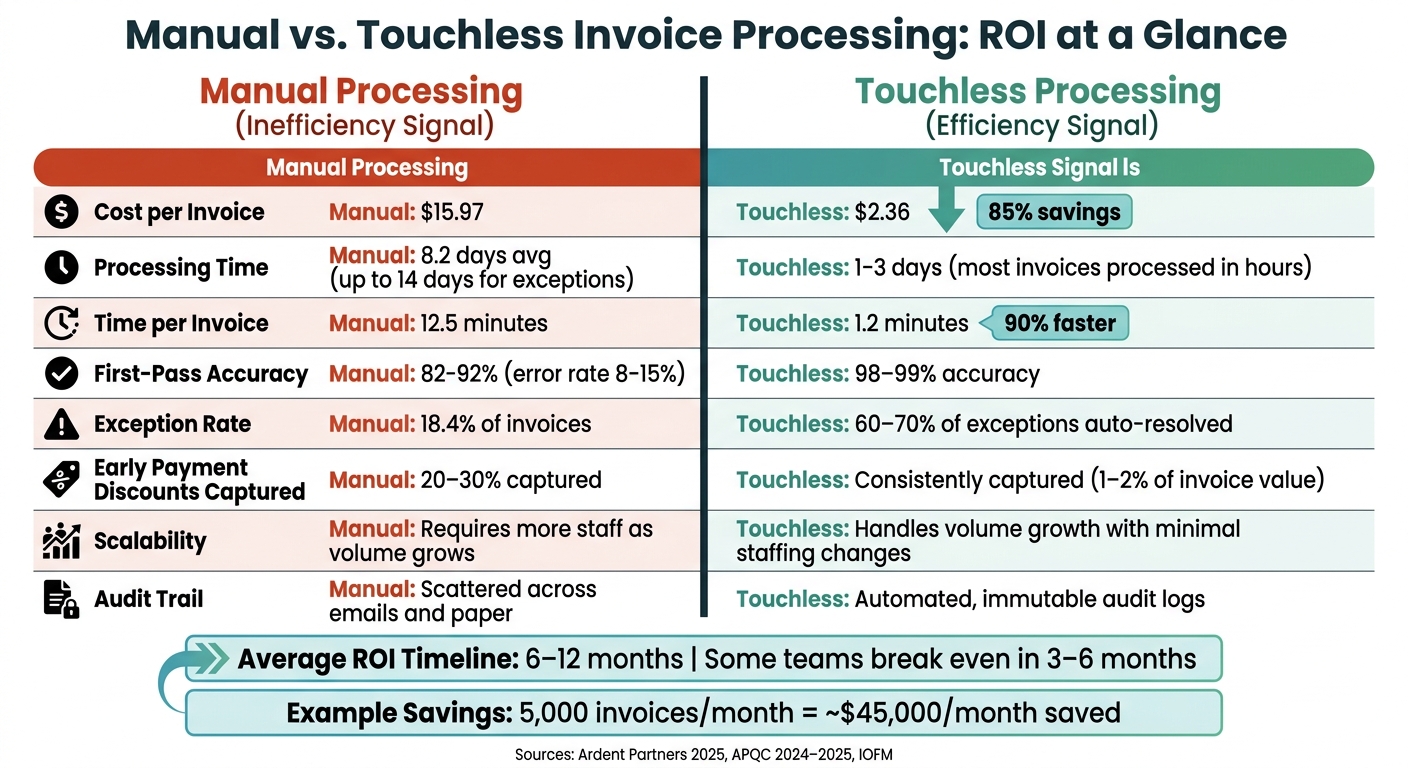
Processing invoices manually comes with a hefty price tag, combining both direct labor and hidden costs like data entry, approval routing, and filing. According to APQC‘s 2024–2025 benchmarking, the median cost of manual invoice processing is $21.40 per invoice. Meanwhile, Ardent Partners‘ 2025 research places this figure at $9.84. Even at the lower end, these numbers represent a significant expense.
But that’s not the full picture. When you factor in downstream error correction – like fixing incorrect entries in an ERP system or reconciling vendor statements – total costs rise by an additional 25–40%. Unlike automation, manual processes scale directly with volume, meaning that higher invoice counts require more staff, not just extra hours.
“The cost per invoice in manual AP is not a controversy in 2026. The IOFM, Aberdeen, and Ardent Partners have independently benchmarked it for over a decade. The question is not what it costs – it is how much of it you are willing to keep paying.”
These escalating costs contribute to longer processing times and inefficiencies that ripple through the organization.
Processing Cycle Time
Manually processing an invoice takes an average of 8.2 days. For invoices with exceptions or added complexity, this timeline can stretch beyond 14 days. Standard tasks alone require about 12.5 minutes per invoice, but exceptions can tack on an additional 15 to 45 minutes per case. This delay often causes companies to miss out on early payment discounts, which are typically 2% for payments made within 10 days. As a result, organizations lose 60–70% of these potential savings.
Exception Rate
Manual accounts payable (AP) processes are notoriously prone to exceptions. On average, 18.4% of invoices encounter issues, with some organizations reporting rates as high as 22%. Each exception demands a manual investigation – whether it’s resolving purchase order mismatches, correcting missing information, or fixing vendor name discrepancies. These tasks pull staff away from more strategic activities.
“Exceptions are typically the biggest single reason why the benchmarks… are not lower. They continue to be the bane of AP’s existence.” – Andrew Bartolini, Founder and Chief Research Officer, Ardent Partners
Supplier inquiries related to exceptions consume nearly 22% of AP teams’ time. These interruptions not only delay invoice approvals but also strain vendor relationships and disrupt cash flow.
Cash-Flow Impact
The inefficiencies of manual processing extend beyond operational headaches – they directly affect financial performance. For a company with $100 million in annual spend, missed discounts and manual errors can lead to a $1.78 million hit to working capital. Duplicate payments alone can account for 0.5% to 2% of total AP spend in manual systems. On top of that, companies typically capture only 20–30% of available early payment discounts.
Late payments can also harm vendor relationships. Suppliers often prioritize customers who pay promptly, especially during inventory shortages or times of limited capacity.
These challenges highlight the pressing need to shift away from manual processes and embrace automation in AP workflows.
2. Touchless Invoice Processing
Manual invoice processing often struggles with high costs and long processing times, but touchless invoice processing changes the game. By automating every step, it eliminates tedious tasks like manual data entry, approval chasing, and paper filing. Instead, AI takes over, extracting, matching, and routing invoice details automatically, with humans stepping in only for flagged exceptions.
Cost per Invoice
The cost difference between manual and touchless invoice processing is staggering. While manual processing costs range from $15 to $20 per invoice, touchless systems bring this down to just $2–$5 per invoice. Some systems achieve costs as low as $2.07 per invoice. These savings add up quickly at scale. For instance, a team handling 5,000 invoices monthly could save around $45,000 every month. Tools like AP Express make this possible by automating tasks such as invoice digitization, approval workflows, and data entry, cutting out time-consuming manual efforts.
“Our team and processes have become much more efficient with AP Express. By utilizing a tool like this, our team has been freed up to work on more important business tasks – and as we continue to grow, add stores and take on more invoice volume, this is key.” – Christopher Gann, AP Manager, Nebraska Furniture Mart
Processing Cycle Time
Beyond cost savings, touchless systems dramatically reduce processing times. Manual processing takes an average of 8.2 days, but automated systems handle most invoices within hours. The time spent on each invoice drops from about 12.5 minutes to just 1.2 minutes – a 90% reduction. Automated workflows also shorten approval cycles from 8–12 days to just 1–3 days, enabling a single AP specialist to process 300–400 invoices daily, compared to only 35–40 manually.
Exception Rate
Touchless systems excel in accuracy, boasting 98–99% first-pass accuracy rates compared to the 8–15% error rates common in manual processes. They also handle 60–70% of exceptions automatically through fuzzy matching and configurable thresholds. For example, minor price differences within a set tolerance (e.g., ±2%) are resolved without human intervention, while remaining exceptions are routed to staff with clear explanations and suggested solutions.
“Low touchless rates are almost never a technology problem. They are a process and data quality problem.” – PayStream Advisors
Cash-Flow Impact
Speeding up invoice processing doesn’t just save time – it also improves cash flow. Faster processing enables AP teams to consistently capture early payment discounts, typically worth 1–2% of invoice value, which are often missed in manual workflows. Real-time ERP integration provides continuous visibility into liabilities, improving cash flow forecasting. Additionally, automated duplicate detection prevents losses that can represent 0.5–2% of total AP spend. For a business with $2 million in monthly spend, capturing a 2% early payment discount could mean an extra $40,000 added to working capital each month.
Pros and Cons
No system is flawless, and both manual and touchless invoice processing come with their own set of trade-offs. Below is a comparison of the key benefits and drawbacks of each approach:
| Feature | Manual Processing | Touchless Processing |
|---|---|---|
| Cost per Invoice | High – about $12.88–$15.97 per invoice | Lower – around $2.36–$5.00 per invoice |
| Processing Speed | Takes an average of 12.5 minutes per invoice | Much faster at 1.2 minutes per invoice |
| Accuracy | Error rates range from 8%–15% due to manual entry | Achieves 98%–99% first-pass accuracy with AI matching |
| Scalability | Requires hiring more staff as volume grows | Handles increased volume with minimal staff changes |
| Audit Trail | Scattered across emails and paper files | Provides automated and immutable audit logs |
| Visibility | Data often stuck in paper files or spreadsheets | Offers real-time dashboards for all invoices |
| Implementation | No upfront costs or integration needed | Requires initial investment and ERP integration |
| Primary Risk | Prone to human error and payment fraud | Relies on clean data and consistent purchase order coverage |
Touchless processing depends heavily on the quality of data. Issues like duplicate vendor records or inconsistent naming conventions can disrupt the system and lead to matching failures, ultimately reducing efficiency.
On the other hand, manual processing carries hidden costs, such as rework, delays in approvals, and missed opportunities for early payment discounts. These costs tend to add up over time. Even with advancements in automation, the average touchless rate across the industry is only 33%, with top performers managing around 52.8%.
Conclusion
Processing accounts payable (AP) manually costs an average of $15.97 per invoice and takes about 10 days to complete. In contrast, touchless processing slashes costs to just $2.36 per invoice and reduces the cycle time to 3 days. These changes not only save money and time but also open the door to additional financial benefits.
With faster processing, businesses can take advantage of early-payment discounts, earn rebate revenue through virtual card payments, and strengthen automated fraud controls. This shift can transform AP from a traditional cost center into a revenue-generating function. As David Luther, Product Marketing Program Manager at Corpay, explains:
“AP is one of the few finance functions where automation can flip the cost center into a contribution center.”
In fact, most AP teams experience a positive return on investment (ROI) within 6–12 months, and some even break even in as little as 3–6 months.
To start, focus on increasing purchase order (PO) coverage and cleaning up vendor master data – these foundational steps have the biggest impact on improving touchless processing rates and maximizing ROI. Tools like AP Express streamline tasks such as invoice digitization, three-way matching, and virtual card payments, making the transition to efficient and scalable AP operations much easier. Christopher Gann, AP Manager at Nebraska Furniture Mart, highlights the benefits:
“Our team and processes have become much more efficient with AP Express. By utilizing a tool like this, our team has been freed up to work on more important business tasks.”
FAQs
What counts as “touchless” invoice processing?
Touchless invoice processing, or straight-through processing, is an automated system that manages the entire lifecycle of an invoice – from receipt to payment approval – without requiring manual input. It takes care of essential tasks such as data capture, validation, three-way matching, GL coding, and ERP posting, all guided by pre-defined rules. Human action is only required when the system encounters exceptions it cannot resolve on its own. With tools like AP Express, this process becomes even smoother, as it integrates directly with your ERP to streamline these workflows efficiently.
What data cleanup is needed before going touchless?
If you’re aiming to get the most out of touchless processing, start by ensuring your master data is clean and dependable. This means auditing and removing duplicates from your vendor master file, standardizing naming conventions, and double-checking tax IDs and banking details. Implement strict controls to block unapproved vendor creation and require unique tax identifiers for every new entry.
Another key factor? Accurate purchase order data. Without it, automated matching can run into issues. Tools like AP Express can help by centralizing supplier data and keeping it organized and error-free.
How do I calculate ROI for my AP team?
To figure out your ROI, compare the savings achieved through automation with the costs of implementing it. Here’s how to break it down:
- Determine your cost per invoice: Use this formula – Total AP Processing Cost ÷ Total Invoices Processed. Be sure to include all relevant expenses, such as labor, overhead, storage, and exception handling.
- Measure your touchless invoice rate: Calculate it with this formula – (Auto-Approved Invoices ÷ Total Invoices) × 100. This gives you the percentage of invoices processed without manual intervention.
- Account for savings:
- Hard-dollar savings: These include tangible benefits like early-payment discounts you gain through automation.
- Labor savings: Multiply the number of hours saved by the hourly wage of your team to estimate how much time automation is freeing up.
By combining these factors, you’ll have a clear picture of how automation impacts your bottom line.
Related Articles
Clean 1099 Reporting Starts Early: Use a Supplier Portal to Validate Vendor TINs
July 9, 2026 1099 problems usually start long before January. If I wait until year-end...
How Supply Chain Finance Improves Cash Flow
June 17, 2026 Supply chain finance (SCF) helps businesses manage cash flow by allowing suppliers...